Your Aquaguard Ivory water purifier uses LED indicators to communicate system status, but understanding what those blinking lights mean can be confusing. When you see a solid red LED or white light flashing, you need to know whether it’s a warning you can handle or an error requiring professional service. This guide decodes every Aquaguard Ivory LED error code for both RO+AUTO UV and UV+UF models so you can troubleshoot quickly and keep your family’s drinking water safe.
Understanding Aquaguard Ivory LED Indicators
Additional Resources for Aquaguard Ivory Owners
If you are expanding your water purification setup to include whole-house filtration, proper maintenance of external components is just as critical as caring for your Aquaguard unit. For instance, ensuring your dust collection system runs efficiently can prevent particulate matter from entering your home’s water environment during plumbing renovations or filter changes. For detailed guidance on keeping your equipment running smoothly, refer to the PowerSmith PAVC101 filter maintenance resource. By integrating these practices, you ensure that both your air and water filtration systems remain in peak condition, protecting your family’s health from multiple angles. Regular checks on your Aquaguard Ivory LED indicators combined with external equipment care will extend the life of your purifier and guarantee consistent water quality.
What LED colors mean on your purifier
Your Aquaguard Ivory uses a simple color system to report what’s happening inside the unit. Each color represents a specific condition, and the way the LED blinks (solid, slow blink, fast blink) tells you whether it’s normal operation or an error. The four main LED colors are:
Green LED: Indicates normal purification is happening (UV+UF model only). Green solid glow means the system is actively cleaning your water during the 30-second purification cycle.
Blue LED: Shows tank filling or tank full status. Blue blinking at 0.5-second intervals means water is currently flowing into your storage tank. Blue solid glow means your tank has reached full capacity.
Red LED: Signals equipment failures or critical errors. This is the most important light to understand, as it indicates UV lamp problems, pump failures, solenoid valve issues, or authentication errors.
White LED: Warns about filter life. White blinking slowly means your filter is nearing end-of-life and needs replacement soon. White blinking fast means replacement is urgent—the unit will stop working once the filter reaches end-of-life (EOL).
Purple LED: Appears only on UV+UF models during DRS (Dry Run Stop) or LPS (Low Pressure Switch) error conditions.
Why LED indicators matter for water safety
The LED system protects your family by alerting you before contaminated water reaches your tap. The RO+AUTO UV model includes an AUTO UV feature that activates the UV lamp for 30 minutes every 7.5 hours whenever the tank refills, providing what Eureka Forbes calls “Storage Stage Protection.” If the UV LED fails, you’ll see a solid red light immediately—this prevents you from drinking potentially unsafe stored water.
Similarly, the white LED filter warnings give you advance notice to schedule service before water quality drops. Ignoring these signals means you could consume water that hasn’t been properly filtered through the recommended 6,000-liter cartridge life.
RO+AUTO UV Model: Complete LED Error Code Reference
Power ON and normal operation lights
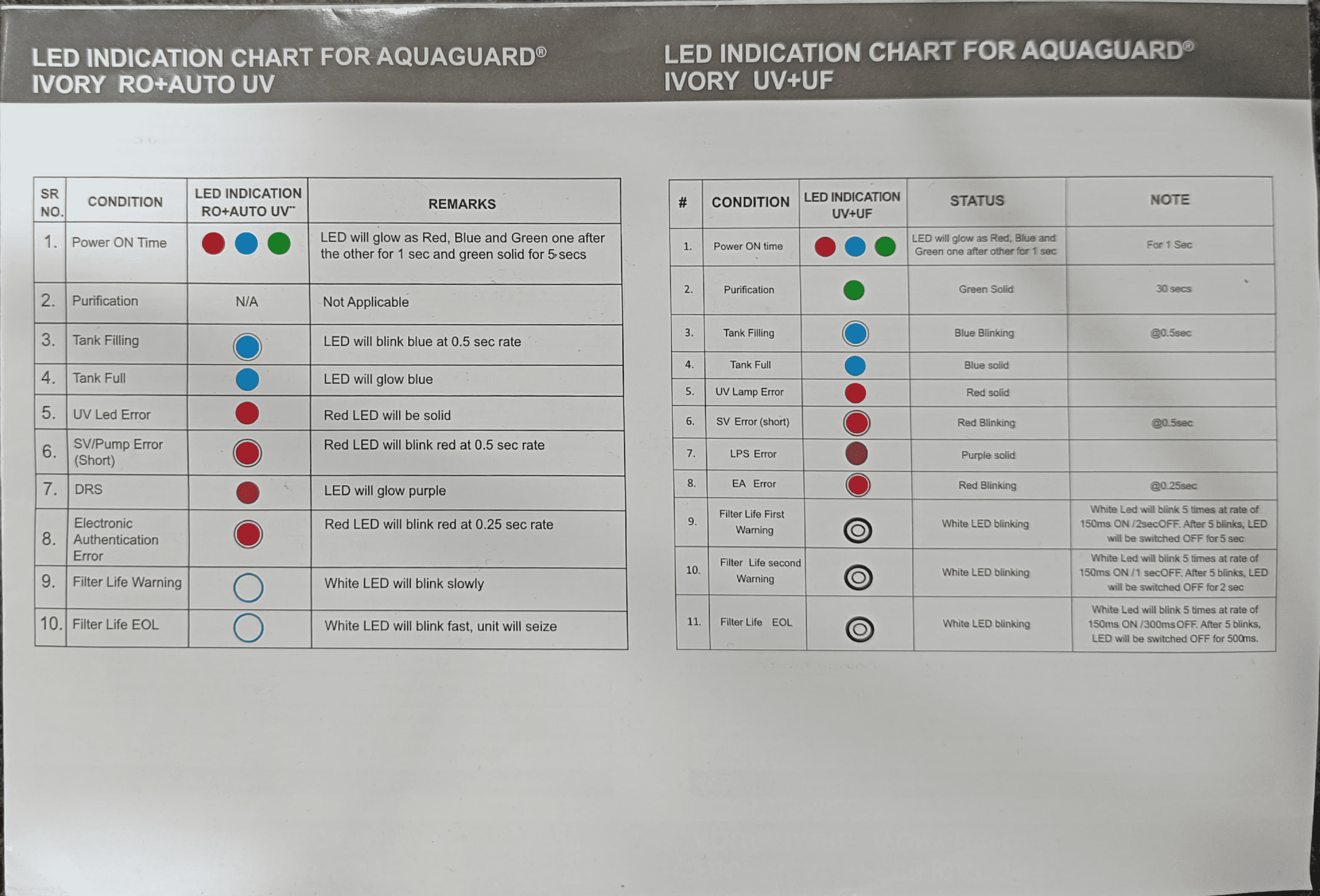
When you first plug in your RO+AUTO UV model, the LED performs a startup sequence. Red, blue, and green LEDs glow one after the other for 1 second each, then green stays solid for 5 seconds. This confirms the system is initializing correctly. If you don’t see this sequence, there’s an electrical issue and you should not attempt to use the unit.
Once startup is complete, the LED goes dark during normal purification (no LED indication applies for this stage). When water is actively flowing into your tank, you’ll see blue blinking at a 0.5-second rate. When the tank reaches capacity, the blue LED turns solid and stays lit.
| LED Status | Condition | What It Means | Action Required |
|---|---|---|---|
| Red, Blue, Green (sequence) then Green solid 5 sec | Power ON Time | System initializing normally | None – normal startup |
| Blue blinking (0.5 sec rate) | Tank Filling | Water is flowing into storage tank | None – normal operation |
| Blue solid | Tank Full | Storage tank has reached 7-liter capacity | None – normal operation |
| Red solid | UV LED Error | Germicidal UV lamp has failed | Call Eureka Forbes service – do not drink stored water |
Red LED errors: UV failure, pump issues, and electronic problems
Red LED signals always indicate a failure that requires professional service. The specific blinking pattern tells you which component has failed. There are three types of red LED errors on the RO+AUTO UV model:
Solid Red LED (UV LED Error): The UV lamp inside your unit has burned out or failed. Since your model relies on AUTO UV technology to protect stored water for safety, a failed UV lamp means your tank water is no longer being disinfected. You should not drink water from the tank until the lamp is replaced by an Eureka Forbes technician. The UV LED in your model is rated for 10,000 working hours. Call your nearest Eureka Forbes service center immediately—this is not something you can repair yourself. The service number is 18602661177.
Red LED Blinking at 0.5-Second Rate (SV/Pump Error): This indicates a short circuit in either your solenoid valve (SV) or pump. The solenoid valve controls water flow into the tank, and the pump pressurizes water through your RO membrane. A failure here means water either cannot flow or is flowing uncontrollably. Do not attempt to use the unit. Contact Eureka Forbes service technician for diagnosis and repair. The issue could be electrical damage or a mechanical blockage.
Red LED Blinking at 0.25-Second Rate (Electronic Authentication Error): Your Aquaguard Ivory has a Health Protect™ feature that electronically authenticates all cartridges to ensure they’re genuine Eureka Forbes parts. This rapid blinking pattern means either a non-genuine cartridge has been installed, or the authentication circuit has failed. If you recently had a service technician replace a filter, verify they used only genuine Aquaguard cartridges. If cartridges are genuine, there’s an internal electronics problem requiring professional service.
Blue LED indicators: Tank filling and full status
Blue LEDs are your normal operating indicators—they’re not errors. Blue blinking at 0.5-second intervals shows active filling. You’ll see this whenever your unit is producing and storing purified water. Once the 7-liter storage tank is full, the blue LED becomes solid and stays on continuously.
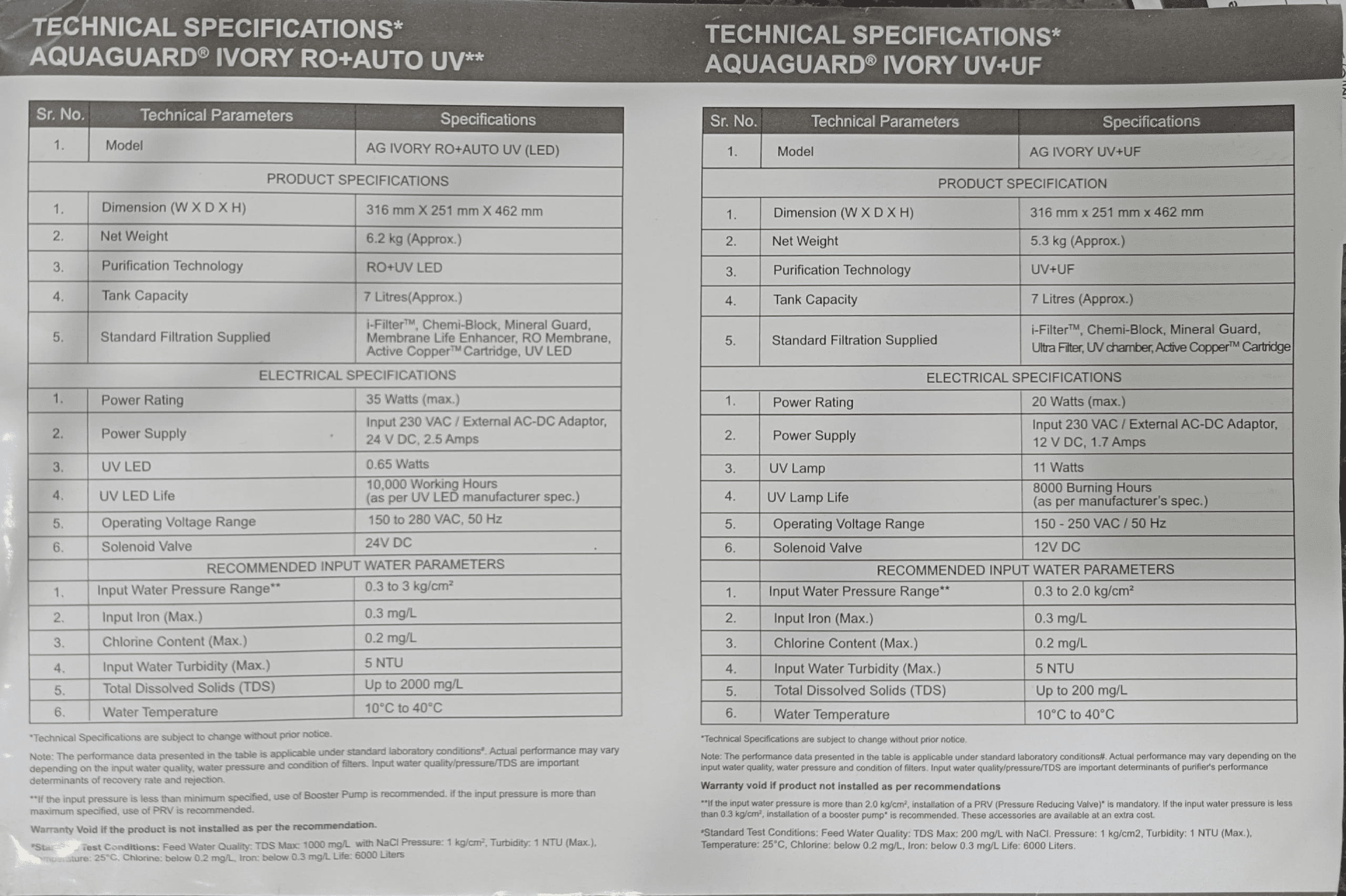
If you notice the blue LED never stops blinking (tank never gets full), there’s likely insufficient water pressure entering the unit. The RO+AUTO UV model requires input water pressure between 0.3 kg/cm² and 3.0 kg/cm². If your building’s water pressure is too low, you may need a booster pump installed by the service technician. If pressure is too high (above 3.0 kg/cm²), you need a Pressure Reducing Valve (PRV) to prevent membrane damage.
White LED warnings: Filter life alerts explained
White LED warnings are your advance notice to schedule filter replacement. There are two white LED states on the RO+AUTO UV:
White LED Blinking Slowly: This is your first filter life warning, appearing around 5,400 liters of usage (90% of the 6,000-liter cartridge life). At this point, you have about 600 liters of capacity remaining. Contact your Eureka Forbes service center to schedule a cartridge replacement appointment at your convenience. Your unit will continue working normally while you arrange service.
White LED Blinking Fast: This signals Filter Life EOL (End-of-Life), meaning your cartridges have reached their 6,000-liter limit. The unit will now seize—it stops producing purified water to prevent poor-quality water from reaching your tap. You must contact Eureka Forbes immediately for cartridge replacement. Do not attempt to use purified water until cartridges are replaced.
The manual specifies that all consumable cartridges should be replaced after approximately 6,000 liters of water usage. This includes the i-Filter™, Chemi-block, RO Membrane, and Active Copper™ cartridge. Only use genuine Eureka Forbes replacement parts—counterfeit cartridges will trigger the electronic authentication error (red blinking at 0.25-second rate) and are not guaranteed safe.
UV+UF Model: LED Status Chart Decoded
Color-coded status indicators for UV+UF systems
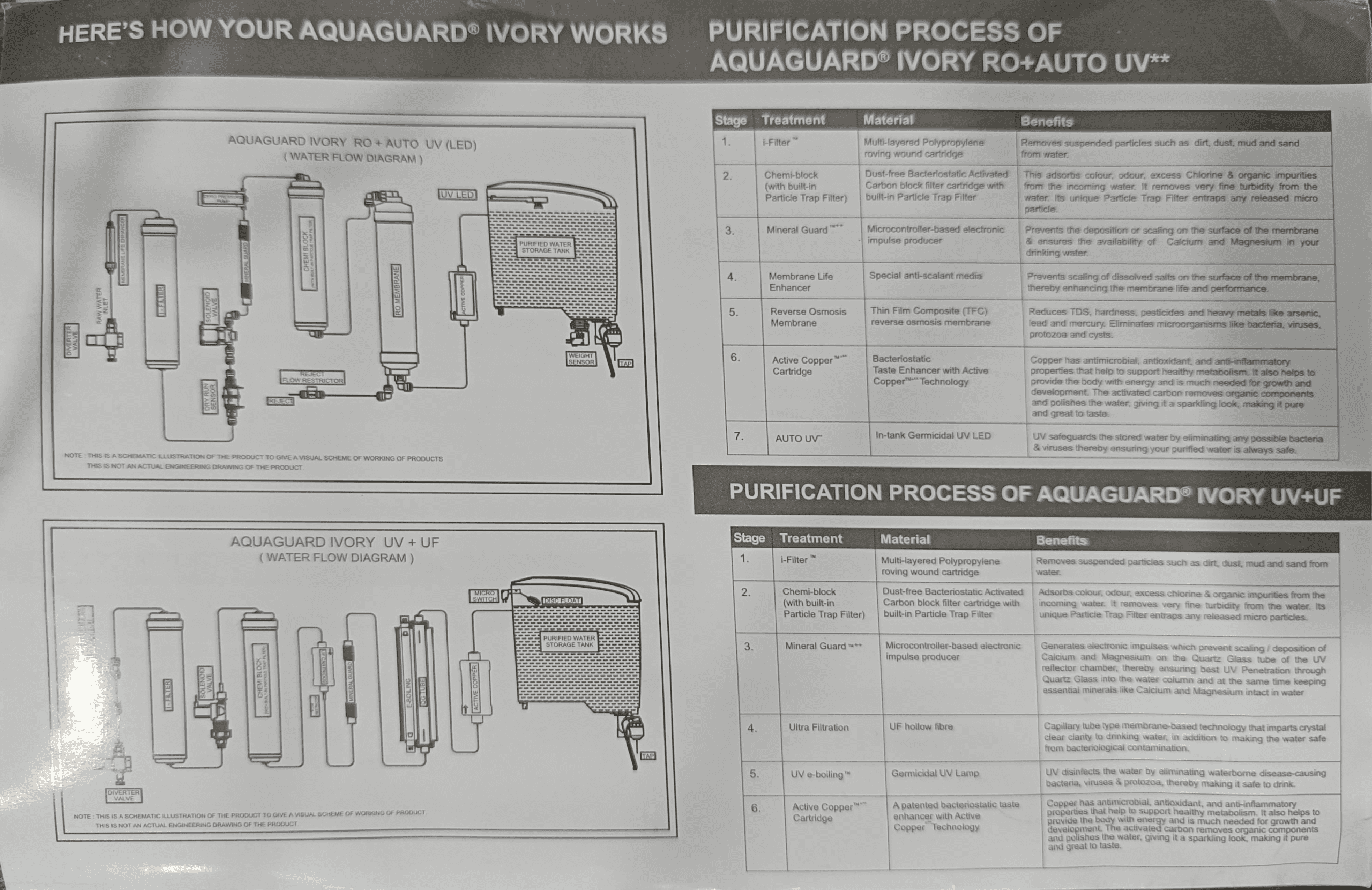
The UV+UF model uses a more sophisticated LED system with additional status codes because it doesn’t have an RO membrane (which handles some of the electronic monitoring on the RO model). Your UV+UF system filters water through i-Filter™, Chemi-block, Mineral Guard™, Ultra Filtration, UV e-boiling™, and Active Copper™ stages instead.
The startup sequence is identical to the RO+AUTO UV: Red, blue, and green LEDs flash one after the other for 1 second each, then green solid for 5 seconds. However, on the UV+UF model, green solid light means active purification (30-second cycle), whereas the RO model has no LED during purification.
| LED Color/Pattern | Condition | Rate/Duration | Meaning |
|---|---|---|---|
| Red, Blue, Green sequence | Power ON Time | 1 sec each | System initializing |
| Green solid | Purification | 30 seconds | Water actively being filtered |
| Blue blinking | Tank Filling | 0.5 sec rate | Purified water flowing to tank |
| Blue solid | Tank Full | Continuous | Storage tank at 7-liter capacity |
| Red solid | UV Lamp Error | Continuous | Germicidal UV lamp failure |
| Red blinking | SV Error (short) | 0.5 sec rate | Solenoid valve short circuit |
| Purple solid | LPS Error | Continuous | Low Pressure Switch error |
| Red blinking | EA Error | 0.25 sec rate | Electronic Authentication error |
Understanding blinking rates and solid lights
Blinking rate matters on the UV+UF model. A 0.5-second blink rate (on/off repeating every 0.5 seconds) is slower and typically indicates a less critical condition. A 0.25-second rate (twice as fast) indicates a more serious problem. Solid lights mean either normal operation (blue, green) or critical failure requiring immediate service (red, purple).
The UV+UF model’s UV lamp is rated for 8,000 burning hours compared to the RO model’s 10,000-hour LED lamp. This is an important distinction—if you use your purifier continuously, the UV lamp will need replacement sooner. The manual specifies this is based on manufacturer specifications for the lamp type.
LPS error and EA error alerts
LPS Error (Low Pressure Switch Error): Purple solid LED indicates the Low Pressure Switch has detected that incoming water pressure is below the minimum required threshold. The UV+UF model requires input water pressure between 0.3 kg/cm² and 2.0 kg/cm² (note this is lower than the RO model’s 3.0 kg/cm² maximum). If pressure drops below 0.3 kg/cm², the LPS error triggers. This commonly happens if your building’s overhead tank is nearly empty or your municipal water supply is low. A booster pump may be needed if pressure is consistently low.
EA Error (Electronic Authentication Error): Red LED blinking at the fast 0.25-second rate signals the same Health Protect™ authentication failure as on the RO model. A non-genuine cartridge has been installed or the authentication circuit has failed. Ensure any cartridge replacement is done by an authorized Eureka Forbes technician using only genuine parts.
Common Aquaguard Ivory LED Problems and Fixes
Solid red LED: UV lamp failure solutions
A solid red LED on either model means your germicidal UV lamp has failed and no longer disinfects your water. This is a critical safety issue because water sitting in your 7-liter storage tank can develop bacteria within hours without UV protection. Do not drink water from the tank until the lamp is replaced.
What’s happening: The UV lamp produces ultraviolet light that kills bacteria, viruses, and protozoa in your stored water. On the RO+AUTO UV model, the AUTO UV feature automatically activates the lamp for 30 minutes every 7.5 hours each time the tank refills, providing continuous protection of stored water. On the UV+UF model, the UV e-boiling™ lamp runs during the purification cycle. Either way, when the lamp burns out, the LED notifies you immediately with a solid red light.
How to fix it: Call Eureka Forbes service center at 18602661177 or SMS ‘REQ’ to 80822 99333. Do not attempt to replace the lamp yourself—the UV chamber contains electrical components that can cause injury. A trained technician will:
- Replace the UV lamp with a genuine Aquaguard part
- Reset the LED system
- Disinfect your storage tank to eliminate any contamination that may have occurred
The UV LED in the RO+AUTO UV model is rated for 10,000 working hours. If you use your purifier regularly (8-10 hours daily), you should expect lamp replacement every 2.5-3 years. The UV lamp in the UV+UF model (8,000 hours) will need replacement sooner.
Blinking red LED: Pump and solenoid valve issues
A red LED blinking at 0.5-second intervals indicates a solenoid valve or pump short circuit. Both components are critical for water flow through your purification system.
Solenoid Valve Failure (0.5-second blink): The solenoid valve is an electronically controlled gate that opens and closes to control water flow into your storage tank. When it short-circuits, water either cannot reach the tank or flows continuously without stopping (causing overflow). This is dangerous because an overflowing tank can cause water damage or allow contaminated water to splash back into your system.
Pump Failure (0.5-second blink): On the RO+AUTO UV model, the pump pressurizes incoming water to force it through the RO membrane (which requires high pressure to function). A pump short circuit means your RO filtration stops working entirely.
Emergency response: Stop using the unit immediately. Turn off the power and close the input water valve. Water will likely be flowing somewhere it shouldn’t be (tank overflow or internal leakage). Call Eureka Forbes emergency service at 18602661177. These are electrical failures that require professional diagnosis and replacement parts. Attempting to repair yourself risks electrical shock and water damage to your home.
White LED blinking slowly: First filter warning response
Slow white LED blinking means your filter cartridges are approaching their rated 6,000-liter lifespan. This is not an emergency—you have time to schedule service.
What it means: Your i-Filter™, Chemi-block, RO Membrane (RO+AUTO UV only), UF Filter (UV+UF only), and Active Copper™ cartridge all have limited capacity. After approximately 6,000 liters of purified water production, the activated carbon becomes saturated with contaminants, the particulate filters become clogged, and the membranes lose filtering efficiency. The white LED warning appears around 90% of cartridge life (approximately 5,400 liters used).
What to do: Contact your nearest Eureka Forbes service center during business hours to book a cartridge replacement appointment. Do not wait until the LED blinks fast. During this slow-blink period, your unit is still producing safe water and working normally. You typically have 1-2 weeks before the fast-blink urgent warning appears. The technician will replace all consumable cartridges at once—mixing old and new cartridges reduces filtration effectiveness.
Costs: Cartridge replacement is not covered under the 12-month warranty (consumables are subject to wear and tear). You’ll pay for cartridges plus service technician labor. The RO Membrane has a separate 1-year (or 6,000-liter) warranty—if it clogs early, contact service to arrange free cleaning or replacement.
White LED blinking fast: Filter end-of-life replacement
Fast white LED blinking means your filter cartridges have reached end-of-life (EOL). Your unit will seize—it stops producing purified water to protect you from drinking inadequately filtered water.
Why the unit stops: After 6,000 liters, the Chemi-block activated carbon cannot adsorb any more contaminants, the i-Filter™ is completely clogged with suspended particles, and the RO membrane or UF filter can no longer efficiently remove bacteria and viruses. Continuing to filter past this point risks delivering contaminated water that hasn’t been properly treated. The fast-blinking LED and automatic shutdown force you to get service before using the unit further.
Emergency service: Call 18602661177 immediately. Service technicians prioritize fast-blink filter EOL calls because customers need water and cannot use their purifier. In most Indian cities where Eureka Forbes operates, service within 5km of your location can typically arrive within 24 hours. Have your invoice or service contract number ready.
Prevention: Schedule service when you see the slow-blink warning, not when you see the fast blink. This prevents your family from losing purified water access and spreads service appointments more conveniently.
How to Reset Your Aquaguard Ivory After LED Error
Safe shutdown and restart procedure
Most LED errors cannot be fixed by simply restarting the unit—errors indicate actual component failures that require service. However, if you experience an LED error and want to rule out temporary electrical glitches, follow this safe restart procedure:
Step 1: Power Down Turn off the water purifier by unplugging the AC adapter from the wall outlet (not by a power switch, which the unit doesn’t have). Wait 30 seconds with the unit unpowered. This allows internal electronics to fully discharge.
Step 2: Close Water Input Turn off the tap valve that supplies water to your purifier. This prevents water from continuing to flow through the system while it’s powered down.
Step 3: Drain the Tank Open the drinking water tap at the front of your purifier and let any stored water drain completely. This depressurizes the system.
Step 4: Restart After 1-2 minutes, plug the AC adapter back in. You should see the startup sequence: Red, blue, and green LEDs flash for 1 second each, then green solid for 5 seconds. If the LED returns to showing an error code immediately after startup, the error is real and requires professional service.
Step 5: Open Water Input Turn the input water tap back on and allow the tank to refill. Watch the LED during filling—it should show blue blinking at 0.5-second intervals.
Note on unplugging: Your Aquaguard Ivory operates on either 24V DC (RO+AUTO UV with 35W max power) or 12V DC (UV+UF with 20W max power) through an external AC-DC adapter. The unit requires continuous power to maintain system pressure and to keep the microcontroller running. Unplugging for more than a few hours can cause water to siphon back into your lines. If you need to service the unit or leave for extended periods, inform your service technician.
When to call Eureka Forbes service technician
Call Eureka Forbes service for any of these LED errors—do not attempt DIY repairs:
- Solid Red LED (UV Lamp Error): Always requires professional lamp replacement. Never try to remove the UV chamber yourself.
- Blinking Red at 0.5-second rate (Pump/SV Error): Electrical component failure requiring technician diagnosis and part replacement.
- Blinking Red at 0.25-second rate (Authentication Error): Either requires genuine cartridge replacement or internal electronics repair.
- Purple Solid (LPS Error on UV+UF): Sensor error or pressure problem—technician will check water pressure and sensor function.
- White LED Blinking (Both rates): Schedule service within reasonable timeframe—slow blink allows 1-2 weeks, fast blink is urgent.
- Any LED error that persists after power restart.
- Multiple LED colors showing simultaneously (except during startup sequence).
- No LED response at all when plugged in.
Contact methods:
| Contact Method | Details | Best For |
|---|---|---|
| Phone | 18602661177 (toll-free) | Immediate service needs, urgent errors |
| SMS | SMS ‘REQ’ to 80822 99333 | Quick service booking during off-hours |
| deepa.customercare@eurekaforbes.com | Detailed issue description, non-urgent | |
| Online | www.eurekaforbes.com service center finder | Locating nearest service center by address |
What to have ready when you call: Your product model (RO+AUTO UV or UV+UF), installation date, and the specific LED color and blinking pattern you’re seeing. If you have your original invoice or service contract, have that number available. This speeds up appointment scheduling and warranty verification.
Preventive maintenance to avoid errors
Many LED errors can be prevented through proper maintenance. The manual specifies these critical care requirements:
Monthly Tank Disinfection: Clean and disinfect your 7-liter storage tank at least once every 30 days using a disinfection tablet (available from Eureka Forbes service centers). If water sits unused for more than 48 hours, drain the tank completely before using the purifier again. Stagnant water grows bacteria that the UV system must work harder to eliminate, stressing the lamp.
Procedure: Drain the tank, wipe the interior with a clean dry cloth, refill, add one disinfection tablet, wait 30 minutes, then drain and refill twice before drinking. This prevents the medicinal taste that sometimes occurs.
Check Input Water Quality: Before any problems occur, have your tap water tested for Total Dissolved Solids (TDS) and Total Hardness. The RO+AUTO UV handles TDS up to 2,000 mg/L, while the UV+UF handles only up to 200 mg/L. If your water exceeds these limits, your RO Membrane or UF Filter will clog much faster than the rated 6,000 liters. If your water contains iron above 0.3 mg/L, Eureka Forbes recommends installing an iron remover as a pre-filter. If turbidity exceeds 5 NTU or contains colloidal particles, a special pre-filter is required.
Maintain Input Water Pressure: Verify your incoming water pressure is in spec: 0.3-3.0 kg/cm² for RO+AUTO UV or 0.3-2.0 kg/cm² for UV+UF. Low pressure requires a booster pump (causing weak filter performance and poor flow). High pressure damages the RO membrane and stresses the system (requiring a Pressure Reducing Valve). Have a technician check pressure if you notice slow water output or fast filter life reduction.
Keep Input Water Temperature Stable: Your purifier is designed for water between 10°C and 40°C. Never connect it to a hot water tap—temperatures above 40°C can damage the RO membrane and degrade plastic components, leading to premature failures and electrical errors.
Use Only Genuine Cartridges: Every cartridge replacement must use genuine Eureka Forbes parts. The Health Protect™ electronic authentication feature will flag counterfeit cartridges with the EA error (red blinking at 0.25-second rate) and shut down your system. Counterfeit cartridges provide unknown filtration—your water could be unsafe.
Annual Mandatory Service: Even if you see no LED errors, schedule annual maintenance with an authorized Eureka Forbes technician. They will check and replace the flow restrictor (if needed), verify all connections are tight, test pressure switches, and disinfect the tank. Regular maintenance catches developing problems before they trigger LED errors that cut off your water supply.
Frequently Asked Questions About Aquaguard Ivory LED Error Codes
What does a purple LED mean on my Aquaguard Ivory?
Purple LED only appears on UV+UF models and indicates two possible conditions: DRS (Dry Run Stop, meaning the tank is refilling) or more commonly LPS Error (Low Pressure Switch error). A solid purple light means incoming water pressure has dropped below the minimum 0.3 kg/cm² threshold. This happens when your building’s overhead tank is nearly empty or during low municipal supply hours. The system stops to prevent damage from low-pressure operation. Refill the overhead tank, wait 5 minutes, then check if the LED returns to normal. If purple persists, call service because the pressure sensor itself may have failed.
Why is my white LED blinking even though I just had the filter replaced?
If the white LED shows any blinking pattern immediately after filter replacement, the technician may have used non-genuine cartridges or installed them incorrectly. Genuine Aquaguard cartridges have electronic chips that authenticate with your purifier. Non-genuine cartridges trigger the EA error (red blinking at 0.25-second rate) instead of white filter warnings. If you’re seeing white blink after service, contact the technician who performed the replacement and request they verify the cartridge batch numbers against Eureka Forbes records. Alternatively, call Eureka Forbes directly at 18602661177 to have an authorized technician verify your cartridges are legitimate and properly installed.
Can I use my Aquaguard Ivory while the red LED is blinking?
No. Any red LED (solid or blinking) indicates a failure that compromises water safety. Solid red means UV lamp failure—water in your tank is not being disinfected. Blinking red means either your pump/solenoid isn’t working (so water cannot flow properly) or your cartridges are non-genuine (so filtration is unverified). In all red LED cases, stop using the purifier and call 18602661177. Do not drink water from the tank until the error is resolved by a technician. Your warranty covers repairs for defects in design and workmanship (12 months from installation), but only if service is performed by authorized Eureka Forbes technicians.
My Aquaguard Ivory LED shows multiple colors flashing randomly—what’s wrong?
Random or simultaneous multiple colors (outside the startup sequence) indicate an internal electronics failure. The microcontroller that manages all LED signals is malfunctioning. This is not something that a power restart will fix. Turn off the unit, close the input water valve, and call Eureka Forbes service at 18602661177. Do not use the unit until it’s been diagnosed by a technician, as faulty electronics can cause improper water flow or allow contamination. Depending on your warranty status and the nature of the failure, the technician may repair or replace the electronic control board.
How often should I expect LED errors on my Aquaguard Ivory?
In normal operation with properly installed, maintained, and serviced equipment using quality input water, you should never see LED errors except the white filter warning at 6,000 liters. Red LED errors indicate equipment failure and suggest either the product received damage during installation, input water quality is outside specifications (damaging filters prematurely), or a component was defective. If your unit is throwing multiple red LED errors within the first year, contact Eureka Forbes support about potential device replacement under warranty. The UV+UF model with its 8,000-hour lamp may show UV failure (red solid) before the RO+AUTO UV model (10,000 hours), but both should last 2-3+ years under normal use before lamps need replacement. If you’re seeing errors sooner, investigate whether your input water quality is the culprit—TDS, iron content, turbidity, temperature, or pressure issues all accelerate filter clogging and component stress.
