If your Ninja BL610 won’t start, the problem usually lies with the safety interlock mechanism or pitcher placement rather than a motor failure. The BL610 is designed with multiple safety features that prevent operation if the pitcher, lid, or blade assembly isn’t positioned correctly—and this is the most common reason people think their blender is broken. Follow this troubleshooting guide to identify and fix the specific issue keeping your Ninja BL610 won’t start troubleshooting needs resolved.
Why Your Ninja BL610 Blender Won’t Start
Check for Overheating and Automatic Reset
If the motor is warm after heavy use, the blender may have triggered an automatic thermal shutoff to protect the unit. Unplug the Ninja BL610 and let it cool for 15–30 minutes, then plug it back in and try again. This is especially common when blending thick mixtures or running the blender for extended cycles. The indicator light may behave differently during this state, so waiting for the motor to reset is essential before testing normal operation again.
Motor doesn’t start or blades don’t rotate
When the motor doesn’t turn on and the blades stay still, your first step is checking the physical setup. The BL610 has built-in safety interlocks that disable the motor if any component isn’t seated correctly. According to the manual’s troubleshooting section, the most frequent causes are an improperly placed pitcher, misaligned lid, or a switch that’s in the Off position. The motor won’t engage until all safety conditions are met—this is intentional design, not a defect.
Power button flashing instead of solid light
When the power button flashes rather than staying solid, this is the BL610’s way of telling you something isn’t right. The manual specifically states: “As a safety feature, the power button will flash and the motor will not work if the pitcher and lid are not installed correctly.” A flashing power button means the safety interlock mechanism has detected a problem and is preventing operation. This requires you to diagnose what’s misaligned—either the pitcher placement, lid positioning, or blade assembly installation.
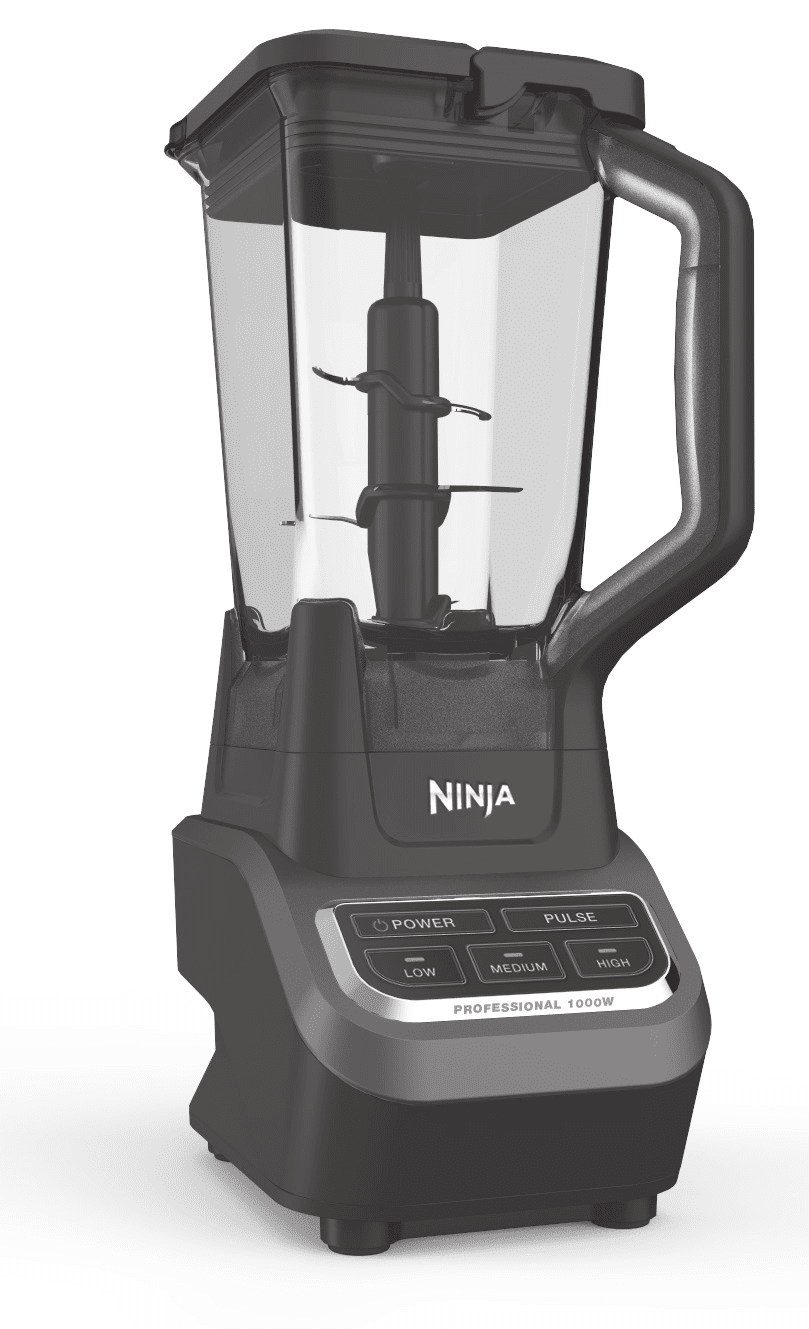
Step-by-Step Troubleshooting for Ninja BL610 Starting Issues
Check pitcher placement on motor base
The pitcher must be positioned correctly on the motor base, or the safety tabs won’t align and the motor won’t start. Here’s the exact procedure from the manual:
Step 1: Place the motor base on a clean, dry, level surface—this is essential because an uneven surface can prevent proper pitcher seating.
Step 2: Lower the pitcher straight down onto the motor base (don’t twist it yet).
Step 3: Rotate the pitcher to the left as far as it will go. As you rotate, the safety tabs on the bottom of the pitcher will slide under the safety tabs on the top of the motor base. You should feel a slight resistance and hear a subtle click when they’re locked.
Step 4: The pitcher can face either direction—with the handle on the front right corner or front left corner—so choose whichever is more convenient for your workspace.
If you rotate the pitcher and don’t feel it drop slightly or lock into place, the pitcher isn’t seated. Try lifting it off and starting over. Make sure you’re rotating left, not right.
Verify lid is correctly seated and aligned
An improperly seated lid is the second most common reason the BL610 won’t start. The lid has locking arrows that must align with arrows on the pitcher handle.
Correct lid positioning requires:
- Place the lid onto the pitcher with the locking handle in the upright position
- Position the pouring spout on the corner opposite the pitcher handle
- Align the arrows located on the lid with the arrows on the pitcher handle—they must line up perfectly
- Press the lid down firmly into the pitcher until it’s completely seated
- Press the locking handle down so the latches on the lid fit under the tabs on the pitcher
The manual notes that the lid must be “completely seated” before the safety interlock will allow the motor to run. If the power button is flashing, remove the lid, check that both sets of arrows are visible and aligned, and reinstall it. Press down with moderate force—you should feel it snap into place.
Confirm blender is turned on with power button
This seems obvious, but verify the power button is actually pressed. On the BL610, when everything is installed correctly and the power button is pressed, it will display a solid light indicating the blender is ready for use. The button you need to press depends on your desired speed:
- POWER button: Turns the blender On/Off
- LOW button: Processing and mixing at low speed
- MEDIUM button: Blending and ice crushing
- HIGH button: Pureeing and liquefying
- PULSE button: Controlled chopping in bursts
Press the POWER button first to turn the blender on. If the power button flashes when you press it, don’t proceed to speed selection—this means the safety interlock is blocking operation due to a pitcher or lid issue.
Inspect power cord and outlet connection
Check the physical power connection next:
Plug inspection: The BL610 has a polarized plug (one blade is wider than the other). Confirm the plug is inserted completely into the outlet—it should go in smoothly. If the plug doesn’t fit fully, flip it around; one orientation is correct, the other isn’t. Never force it. If it still won’t insert, you may have an outlet problem and should contact a qualified electrician.
Outlet testing: Plug in a different appliance (a lamp, for example) to verify the outlet is working. If the other device doesn’t work, the outlet is dead. Check your circuit breaker or fuse box and reset any breakers that have tripped.
Cord damage: Inspect the entire power cord for cuts, cracks, or exposed wires. If the cord is damaged, unplug the blender immediately and contact customer service at 1-877-646-5288. Operating a blender with a damaged cord creates a shock hazard and is not safe.

Fixing Common Safety Interlock Problems
Understanding the safety interlock mechanism
The safety interlock mechanism is a feature designed to prevent injury. It stops the motor from running if any of these conditions aren’t met: the pitcher isn’t properly seated on the motor base, the lid isn’t correctly positioned, or the blade assembly isn’t installed. This mechanism is not a flaw—it’s a required safety feature that makes the BL610 safer to use.
The motor base contains safety tabs on its top surface. When you rotate the pitcher onto the base, the safety tabs underneath the pitcher must slide beneath these motor base tabs. This physical lock is what allows electrical contact to complete the circuit. If the pitcher isn’t rotated fully to the left, the safety tabs won’t line up and the circuit remains broken—the motor won’t start.
Similarly, the lid has a latching mechanism. When pressed down completely and the handle is folded, latches on the lid must fit under tabs on the pitcher. When this happens, the interlock switch closes, signaling that the blender is safe to operate.
How to properly align arrows on lid and pitcher
The arrows on the lid and pitcher handle serve as a visual alignment guide. Before you press the power button, follow this procedure:
Step 1: Hold the pitcher in your non-dominant hand and the lid in your dominant hand.
Step 2: Look at the arrows printed or molded into both the lid and the pitcher handle. These are typically located on the front facing edges where they’re easy to see.
Step 3: Rotate the lid or pitcher until the arrows point in the same direction and are aligned vertically with each other.
Step 4: Lower the lid onto the pitcher and press down with steady, moderate pressure. You should feel the lid seat into the pitcher.
Step 5: Press the locking handle down. The latches underneath it will slide into position under the pitcher tabs. You’ll feel a distinct snap when they lock.
If you press the power button and it flashes, remove the lid completely and inspect both arrow locations. Sometimes food residue or dishwashing detergent can obscure the arrows. Clean the handle area with a dry cloth and try again.
Ensuring blade assembly is installed correctly
The blade assembly must be installed on the gear shaft inside the pitcher before you add ingredients and before the lid goes on. The manual states: “Never add ingredients into the pitcher before placing the blades in first.”
Correct blade installation:
Always hold the blade assembly by the shaft—never by the blades, as they are extremely sharp. Lower the blade assembly straight down onto the gear shaft inside the pitcher. The assembly should fit around the gear shaft and sit flat with the shaft standing straight up. If the shaft is tilted at an angle, the blade assembly isn’t installed correctly. Lift it off and reposition it.
The manual contains a specific caution: “To reduce risk of injury, never place the blade assembly on base without pitcher properly attached.” This means always have the pitcher on the motor base before installing the blades. The blade assembly should never be placed directly on the motor base without the pitcher in between.
Verify the blade assembly is fully seated by gently pressing down on the blades (at the shaft only) and making sure they don’t wobble. If they move side to side, the assembly isn’t completely on the gear shaft.
Electrical Issues and Thermal Overload
Circuit breaker and fuse troubleshooting
The BL610 operates on 120V, 60Hz household current with a 1000-watt motor. This is a significant power draw, and if you have an older home with insufficient electrical capacity or a faulty circuit, you might experience problems.
Check your circuit breaker: Go to your electrical panel and look for any breakers that are in the middle position (tripped). Flip any middle-position breakers fully to the Off position, then flip them back to On. This resets them. If the same breaker trips immediately when you plug in the blender, that circuit has a fault and you need to contact a licensed electrician.
Don’t use extension cords: The manual explicitly states extension cords are not recommended. The BL610 draws a lot of current, and running it through an extension cord can cause voltage drop, which may prevent the motor from starting or cause it to run poorly. Always plug the BL610 directly into a wall outlet.
Dedicated outlet: If possible, use an outlet that isn’t already supplying power to other high-draw appliances. Running the blender at the same time as a microwave or toaster might overload the circuit and trip the breaker.
Thermal switch activation and reset procedure
If you’ve been running the blender continuously or if it’s already been used recently and is still warm, the thermal switch might have activated. The BL610 has a built-in thermal switch designed to protect the motor from overheating.
How the thermal switch works: If the appliance overheats, the thermal switch automatically shuts off the motor. This is a safety feature—if the motor gets too hot, it stops running to prevent damage or fire.
How to reset the thermal switch:
Step 1: Unplug the blender from the electrical outlet immediately. Do not attempt to restart it while it’s still hot.
Step 2: Wait approximately 15 minutes for the motor to cool down. This is the standard cooldown period specified in the manual.
Step 3: After 15 minutes, plug the blender back in and try again.
If the thermal switch activates repeatedly, you’re either running the blender too long without breaks or blending items that require excessive motor strain (like crushing large amounts of ice continuously). Thermal activation is normal if you operate the blender for extended periods. Let it cool between uses.
When to contact customer service
If you’ve completed all the troubleshooting steps above and the blender still won’t start—pitcher is properly seated, lid is correctly aligned, power cord is plugged in, outlet is working, and there’s no thermal shutdown—contact Ninja customer service:
Phone: 1-877-646-5288
Website: www.ninjakitchen.com
Have the following information ready when you call:
- Model number (BL610)
- Proof of purchase and date (if within the one-year warranty period)
- A description of exactly what happens when you press the power button (flashing light, no light, motor hums but doesn’t spin, etc.)
- The steps you’ve already tried
The BL610 includes a one-year limited warranty covering material defects and workmanship. If your blender fails while under warranty and you’ve verified it’s not an assembly or installation issue, Ninja will repair or replace it.
Quick Reference: 5-Minute Fix Checklist
Immediate steps to try first
If your BL610 won’t start right now, go through this checklist in order. Most issues resolve within these steps:
| Step | Action | What to Look For |
|---|---|---|
| 1 | Check pitcher placement | Pitcher rotated fully left and locked onto motor base? Feel the safety tabs slide underneath? |
| 2 | Check lid alignment | Arrows on lid and pitcher handle aligned? Lid pressed down completely? Locking handle folded down? |
| 3 | Check power button | Is power button solid light (ready) or flashing (error)? If flashing, go back to step 1 or 2. |
| 4 | Check power cord | Plug fully inserted? Outlet working with another appliance? Cord undamaged? |
| 5 | Check circuit breaker | Any tripped breakers in the panel? Reset if tripped. |
| 6 | Wait for thermal reset | If recently used, unplug and wait 15 minutes. Try again. |
When the motor overheats and how to reset it
Thermal overload is not a sign of a broken blender—it’s the safety system working correctly. The BL610’s motor can generate significant heat during heavy use, especially when crushing ice or blending tough ingredients continuously.
Signs of thermal shutdown:
- Blender stops suddenly during operation
- Power button no longer responds when pressed
- Motor base feels warm to the touch
- Blender won’t start when you try again immediately
Reset procedure:
1. Stop immediately: Turn off the blender if it hasn’t already shut down automatically.
2. Unplug the unit: Disconnect the power cord from the outlet. This ensures the thermal switch fully disengages.
3. Wait 15 minutes: Set a timer. The motor needs adequate time to cool. Don’t attempt to use it sooner.
4. Plug back in: After 15 minutes have passed, plug the blender back into the outlet and try a shorter blending cycle.
Prevention tips:
- Don’t run the blender for more than 2-3 minutes continuously when crushing ice or blending very thick mixtures
- Allow 5-10 minutes of rest between successive blending cycles if doing multiple batches
- Never operate the blender empty, as this causes excessive motor strain with no load to dissipate energy
- Don’t blend hot liquids—the manual explicitly warns against this, and it can overheat the motor faster
Frequently Asked Questions
Why does the power button flash even though the pitcher and lid look correctly installed?
The most common reason is incomplete seating of either the pitcher or lid. Even if they appear correctly positioned, they may not be fully locked. For the pitcher, rotate it to the left until you feel it click and drop slightly into place—don’t stop when it first stops moving. For the lid, press down with moderate force until it seats completely, then fold the locking handle down fully. The flashing light means the safety interlock has detected that the blender isn’t fully assembled. Reseat both components and try again.
Can I use an extension cord with the Ninja BL610?
No. The manual specifically states: “Extension cords are not recommended for use with this product.” The BL610’s 1000-watt motor draws significant current, and extension cords can cause voltage drop, which prevents the motor from starting or causes it to run at reduced power. Always plug the blender directly into a wall outlet. If your outlet is too far away, move the blender closer rather than using an extension cord.
What’s the difference between the power button being solid versus flashing?
A solid power button light indicates the blender is ready to use—all safety interlocks are satisfied and you can operate it normally. A flashing power button means the safety interlock has detected a problem: the pitcher isn’t securely on the motor base, the lid isn’t properly seated and aligned, or the blade assembly isn’t correctly installed. Do not try to force the blender to work when the button is flashing. Diagnose and fix the assembly issue first.
How long does the blender need to cool after thermal shutdown?
Wait approximately 15 minutes before using the blender again after thermal shutdown. This is the specific timeframe provided in the manual. Waiting less than 15 minutes risks immediate re-shutdown. If you need to use the blender for multiple tasks, split them into shorter cycles with breaks between them to avoid repeated thermal shutdowns.
Is the thermal switch a sign that my blender is broken?
No. Thermal shutdown is an intentional safety feature, not a defect. The BL610’s motor can become very hot during heavy use, especially continuous ice crushing or blending thick mixtures. The thermal switch prevents damage to the motor and fire risk by shutting down operation when it detects dangerous heat levels. This is normal operation. Only contact customer service if the blender won’t start at all even after proper cooldown and reassembly, or if it’s constantly thermal shutting down on light blending tasks.
