The Thermowatt T-MEC 2 operating modes guide covers five distinct settings that control how your immersion heater manages water temperature and energy consumption. Understanding when to use ECO mode, OPK mode, MAX mode, antifreeze protection, and the safety OFF position will help you optimize your hot water system and reduce energy waste.
Introduction to T-MEC 2 Operating Modes
How to Set Antifreeze Protection on Thermowatt T-MEC 2
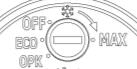
To activate antifreeze protection, rotate the knob anticlockwise until the indicator aligns with the snowflake symbol. In this setting, the Thermowatt T-MEC 2 automatically maintains water at approximately 5°C (41°F) to prevent pipe freezing and costly damage during winter. Unlike ECO or MAX modes, this function prioritizes system protection over hot water availability, using minimal energy to keep the tank just above freezing. This mode is ideal for seasonal homes or unheated spaces where the risk of frost is high but constant high-temperature water is unnecessary. Always verify the knob slot is flush with the antifreeze label to ensure activation. Using this setting correctly helps avoid unexpected shutdowns and extends the life of your immersion heater.
Why thermostat mode selection matters
Your T-MEC 2 thermostat isn’t just an on-off switch—each mode controls temperature, energy efficiency, and protection differently. Selecting the wrong mode can waste electricity, trigger safety cutouts unnecessarily, or leave your system unprotected during winter. The mode you choose determines whether your heater learns your hot water patterns (ECO mode) or maintains a fixed temperature (OPK or MAX modes).
How to adjust the control knob
The five operating modes are accessed by rotating the adjustment knob on your thermostat. Turn the knob anticlockwise to move through ECO, OPK, OFF, and Antifreeze modes. Turn it clockwise to reach MAX mode. The slot in the adjustment knob must align with the required mode label for that setting to activate.
Factory default setting and what it means
Your T-MEC 2 arrives pre-set to ECO mode at 70°C, which is the factory default. This setting prioritizes energy efficiency by using smart learning technology to track your household’s hot water usage patterns. However, the manual notes that changing the thermostat from this factory pre-set position may impact the efficiency rating of your cylinder, so confirm your actual installation requirements before switching modes.
ECO Mode: Smart Learning Technology

How ECO mode learns your habits
ECO mode is the factory-default setting and uses built-in intelligence to optimize heating based on your actual hot water demands. During the first week of operation, the thermostat runs continuously at 70°C while recording when and how often you use hot water. After week one, the system automatically adjusts to lower temperatures during periods when you typically don’t need hot water, then returns to higher temperatures before you usually need it. This learning cycle repeats weekly, becoming more accurate over time.
Energy efficiency benefits explained
By automatically reducing temperature during low-demand periods, ECO mode cuts electricity consumption compared to fixed-temperature modes. The system heats water only when it predicts you’ll need it, rather than maintaining a constant high temperature 24/7. This approach also reduces limestone deposits since the water isn’t held at maximum temperature continuously. The manual recommends maintaining temperatures no lower than 60°C to prevent bacterial growth while still benefiting from smart heating.
What happens during the first week of operation
When you first install your heater in ECO mode, expect the thermostat to maintain 70°C continuously for seven days. During this week, the electronic sensors monitor your hot water usage patterns—what time you shower, when you wash dishes, how many people use hot water simultaneously. This data collection period is crucial; without a full week of usage data, the system cannot optimize properly in subsequent weeks. Antibacterial mode functions during this initial week and all ECO mode operation.
Power loss effects on ECO mode data
If your power supply is interrupted—whether from a circuit breaker trip, power outage, or deliberate disconnection—your T-MEC 2 loses all recorded learning data immediately. The thermostat will restart the entire learning cycle from week one again, running at 70°C while it re-records your usage patterns. This is a significant disadvantage in areas with frequent power interruptions. If you experience regular power loss, consider switching to OPK mode instead, which is unaffected by supply interruptions.
OPK Mode: Basic Manual Control
Ideal for timer-based systems
OPK mode provides straightforward manual temperature control without smart learning features. This mode is designed for installations using external timers or economy-rate electricity systems where you manually control when the heater operates. With OPK mode, you decide exactly when heating occurs—typically during economy rate periods overnight—rather than letting the thermostat learn your patterns.
Maximum temperature at 60°C
When set to OPK mode, your T-MEC 2 will control water temperature to a maximum of 60°C, regardless of knob position adjustments. This built-in safety limit prevents overheating while still meeting the manual’s minimum recommendation of 60°C for antibacterial effectiveness and safety. You cannot exceed 60°C in this mode, even if you turn the adjustment knob further.
Power supply interruption immunity
Unlike ECO mode, OPK mode is completely unaffected by power interruptions. If your electricity supply cuts out and restores, the thermostat continues operating in OPK mode at its last setting without losing any data or requiring re-learning. This immunity to power loss makes OPK mode ideal for locations prone to electrical fluctuations or where system reliability is critical.
Economy installation applications
OPK mode is the default choice for economy-rate installations where your utility company offers cheaper electricity during specific hours (typically 11 PM to 7 AM). You integrate an external timer with the heater’s power supply, and the timer controls when OPK mode heats water. This approach saves money by heating during cheaper rate periods rather than allowing smart heating throughout the day. Antibacterial mode functions in OPK mode operation.
OFF Mode: Safety Cutout Only
When to use OFF mode
Select OFF mode when you want to completely disable the thermostat’s temperature control function—for example, during extended holidays when you don’t need hot water, or when performing maintenance. In this position, the thermostat stops actively controlling temperature, but the safety system remains active as a final protection layer.
Double pole safety function only
Even in OFF mode, your T-MEC 2 retains its critical safety feature: a double pole safety cutout mechanism. This cutout can disconnect both the live and neutral supply conductors with a single action if water temperature becomes dangerously high due to thermostat malfunction. This dual-conductor disconnection is a fundamental safety requirement that cannot be disabled. The cutout also includes a resettable mechanism that prevents excessive temperatures by limiting power if the primary temperature sensor fails.
Antibacterial mode status in OFF position
When your thermostat is in OFF mode, antibacterial heating cycles do not function. This is the only mode where antibacterial protection is completely deactivated. If you need extended OFF mode periods, remember that stagnant water at room temperature can harbor bacteria; consider switching to Antifreeze mode (which maintains 20°C minimum and preserves antibacterial cycles) rather than OFF mode for prolonged non-use.
Antifreeze Mode: Winter Protection

20°C minimum temperature setting
Antifreeze mode maintains your tank water at a minimum of 20°C continuously. This setting prevents the catastrophic damage that occurs when water inside your immersion heater and pipework freezes during cold winter periods. At 20°C, water remains liquid and can circulate, protecting your entire heating system from freeze damage even during extended sub-zero temperatures.
Preventing water heater freeze damage
When water freezes inside an immersion heater element or the surrounding pipework, the ice expands and creates enormous pressure that can crack the tank, rupture pipes, and destroy the heating element. The resulting water damage to your property can cost thousands to repair. Antifreeze mode prevents this by keeping water just warm enough to remain liquid. The 20°C setting is low enough to minimize energy consumption while staying well above freezing point (0°C) in all normal winter conditions.
Seasonal use recommendations
Switch to Antifreeze mode in autumn before temperatures consistently drop below 10°C, especially if your immersion heater is installed in an unheated garage, shed, or external location. If your property will be vacant during winter, Antifreeze mode is essential—it requires minimal electricity while protecting your investment. Return to your preferred mode (ECO, OPK, or MAX) once spring temperatures arrive and freezing risk ends. Antibacterial mode continues to function in Antifreeze mode, protecting water quality during this protection period.
MAX Mode: Maximum Temperature Control
70°C maximum temperature capability
MAX mode allows your thermostat to heat water to its maximum setting of 70°C. This is the hottest temperature your T-MEC 2 can deliver and is suitable for installations requiring consistently hot water. Like the factory-default ECO mode, MAX mode reaches 70°C, but MAX mode maintains this temperature based on manual knob adjustments rather than learning your usage patterns.
Fine-tuning temperature with adjustment knob
Once you’ve selected MAX mode by turning the knob clockwise, you can adjust the actual temperature target by continuing to turn the knob anticlockwise up to an 80° rotation. This rotation range allows you to set any temperature from 70°C down to approximately 10°C. A quarter-turn reduction typically lowers temperature by 10-15°C, but the relationship isn’t perfectly linear—test your preferred setting and observe the resulting water temperature over several hours to confirm the exact adjustment point you need.
Range from 70°C down to 10°C
MAX mode’s full adjustment range spans from maximum 70°C down to approximately 10°C, giving you complete manual control over your water temperature. This wide range accommodates various applications: set it at 70°C for daily domestic use, or reduce it to 45°C if you have young children and want to prevent scalding risk, or lower it to 20°C for frost protection similar to Antifreeze mode. Antibacterial mode functions throughout the MAX mode operating range, maintaining water hygiene regardless of your temperature setting.
Which Mode Saves the Most Energy?
ECO mode efficiency rating impact
ECO mode, the factory-default setting, delivers maximum energy efficiency by learning your household’s hot water patterns and only heating when needed. However, the manual specifically warns that “Changing thermostat setting from the factory pre-set position may impact upon the efficiency rating of the cylinder in which it is fitted.” This means if your water heater was tested and certified for energy efficiency at ECO mode, switching to OPK or MAX mode could reduce the published efficiency rating by 5-15%, depending on your actual usage patterns and the cylinder manufacturer’s test conditions.
Comparing energy consumption across modes
| Mode | Temperature Control | Energy Efficiency | Best For |
|---|---|---|---|
| ECO | Smart learning, 70°C max initially | Highest (factory-certified) | Daily home use, variable schedules |
| OPK | Fixed 60°C maximum | Moderate (fixed 60°C baseline) | Timer-based, economy-rate heating |
| MAX | Fixed at set temperature, 70°C max | Lower (maintains constant temperature) | Maximum hot water availability |
| Antifreeze | Minimum 20°C only | Very high (minimal heating) | Freeze protection, seasonal use |
| OFF | None (safety cutout only) | Highest (no heating) | Extended vacancy, maintenance |
ECO mode typically uses 10-20% less energy than OPK mode over a month because it reduces heating during low-demand periods. OPK mode at fixed 60°C uses less than MAX mode at 70°C. Antifreeze mode uses minimal energy since it only prevents freezing rather than providing usable hot water. For energy bills, ECO mode is the clear winner if your usage varies throughout the week; OPK mode is better if you deliberately restrict heating to economy-rate periods.
Limestone deposit reduction strategies
Higher water temperatures accelerate limestone (calcium carbonate) buildup inside your tank and pipework, reducing system efficiency and lifespan. The manual specifically recommends: “low water temperature is recommended to reduce limestone deposit (Not lower than 60°C).” This guidance suggests using the lowest temperature that still meets your hot water needs. In ECO mode, the thermostat automatically reduces temperature during non-use periods, minimizing deposit buildup. In MAX or OPK modes, manually set the temperature to 60°C rather than 70°C if limestone is a known problem in your area—this reduces deposits while maintaining the minimum safety temperature threshold.
Switching Modes & Best Practices
How to change modes safely
To switch modes safely, turn off the immersion heater at its isolating switch before adjusting the thermostat knob. Wait 2-3 minutes for the thermostat electronics to cool, then rotate the adjustment knob to align the slot with your desired mode (rotate anticlockwise for ECO, OPK, OFF, or Antifreeze; clockwise for MAX). Once the mode is selected, switch the heater back on and monitor the water temperature over the next 30 minutes to confirm the new mode is controlling temperature correctly. If switching from ECO mode and you lose power during the transition, ECO mode will restart its learning cycle.
Recommended temperature settings (60°C minimum)
The manual’s primary safety and efficiency recommendation is: maintain water temperature at no lower than 60°C. This minimum achieves three goals simultaneously: it kills harmful bacteria (including Legionella), it reduces the risk of the safety cutout triggering unnecessarily, and it provides adequate hot water for normal domestic use. Most households find 60-65°C sufficient for daily needs while avoiding excessive energy consumption. In MAX mode, reduce the setting from 70°C to 60°C by turning the adjustment knob anticlockwise approximately 25-30°. In OPK mode, this 60°C ceiling is automatic.
Antibacterial mode functionality per setting
Antibacterial mode—periodic heating cycles that prevent bacterial growth—functions in ECO, OPK, Antifreeze, and MAX modes. It does not function only in OFF mode. This automatic protection operates independently of your temperature settings and mode selection, periodically raising water temperature slightly to eliminate potential pathogens. For maximum protection during winter months when using Antifreeze mode, keep the thermostat in Antifreeze rather than OFF mode; your energy cost is minimal while antibacterial cycles continue operating.
Practical Mode Selection Quick Reference
| Your Situation | Recommended Mode | Why This Mode |
|---|---|---|
| Normal daily home use, variable schedules | ECO (factory default) | Learns your patterns, saves most energy, certified efficiency |
| Heating only during economy-rate hours with timer | OPK | Fixed 60°C, unaffected by power loss, timer-compatible |
| Need maximum hot water constantly available | MAX | Maintains up to 70°C, manual control, immediate hot water |
| Winter property protection from freezing | Antifreeze | Maintains 20°C minimum, prevents pipe damage, low energy use |
| Extended vacancy or major maintenance work | OFF | No heating, safety cutout remains active, minimal standby loss |
FAQ: T-MEC 2 Operating Modes
Will switching from ECO mode to OPK mode reduce my water heater’s efficiency rating?
Yes. The manual explicitly states: “Changing thermostat setting from the factory pre-set position may impact upon the efficiency rating of the cylinder in which it is fitted.” ECO mode is the factory-preset and the mode your cylinder was likely tested at for energy certification. Switching to OPK or MAX mode could reduce the published efficiency rating by 5-15%, depending on your usage and the cylinder manufacturer’s test standards. Only switch if your installation requires timer control (OPK) or maximum temperature availability (MAX).
Can I use MAX mode with a timer for economy-rate heating?
Technically yes, but OPK mode is the better choice. Both modes allow timer control, but MAX mode heats to up to 70°C while OPK mode is limited to 60°C maximum. If you’re heating during economy-rate periods and want to minimize energy costs, OPK mode’s 60°C ceiling is more appropriate. Additionally, OPK mode is completely immune to power interruptions, whereas MAX mode may require adjustment if power is lost during timer operation.
Should I use Antifreeze mode or OFF mode during winter holidays?
Use Antifreeze mode instead of OFF mode. Both protect against damage while you’re away, but Antifreeze mode maintains 20°C minimum temperature and keeps antibacterial protection active with minimal energy use. OFF mode disables antibacterial cycling entirely. If you’ll be gone for more than 2-3 weeks during cold weather, Antifreeze mode is the safer choice; the tiny energy cost is worth the bacteria protection and freeze prevention.
Why did my safety cutout trip after I switched to MAX mode?
The safety cutout trips when water temperature exceeds a threshold (typically 90-95°C) that indicates thermostat malfunction. If it triggers frequently after a mode change, you’ve likely adjusted the MAX mode temperature too high or your thermostat sensor is failing. The manual recommends: “It may be helpful to lower the thermostat setting to avoid unnecessary cut offs.” Try reducing MAX mode temperature to 60-65°C and observe for 24 hours. If cutouts continue, have a qualified electrician inspect the thermostat, as it may need replacement.
Will ECO mode restart learning if my power is cut off?
Yes, completely. “In the event of any power loss the thermostat will lose all recorded data, and will restart learning mode.” If your electricity is interrupted for any reason—circuit breaker trip, power outage, or disconnection—ECO mode resets to week-one learning. It will run at 70°C continuously while re-recording your usage patterns for another seven days. If power interruptions occur regularly at your property, consider switching to OPK mode, which is unaffected by supply loss.
