
Your Aquaguard Ivory’s storage tank can harbor bacteria, algae, and contaminants even after purification if not disinfected regularly. A proper Aquaguard Ivory water tank disinfection cleaning procedure every 30 days prevents bad water taste, odor, and microbial growth that compromise the quality of your purified water. This guide walks through the exact 10-step disinfection process from the manual, safety precautions with disinfection tablets, and troubleshooting steps for common problems.
Why Regular Tank Disinfection Is Critical
Health risks from contaminated storage tanks
Even purified water stored in a contaminated tank becomes unsafe. Bacteria and viruses can grow inside the 7-liter storage tank if it’s not cleaned regularly, introducing pathogens directly into your drinking water. The manual explicitly states that storage tank must be periodically (at least once in every 30 days) cleaned using a disinfectant—this isn’t optional maintenance, it’s a required safety procedure. Neglecting this step defeats the purpose of your multi-stage purification system because stored water sits vulnerable to secondary contamination.
Bacteria and algae growth prevention
Tank interiors create ideal conditions for microbial growth: dark, enclosed spaces with standing water and minimal air circulation. Algae thrives in this environment and produces compounds that affect water quality. Bacteria can multiply exponentially in stored water over 24-48 hours. Monthly disinfection with tablets breaks this cycle and kills existing colonies before they establish. If you haven’t used the purifier for over 48 hours, the manual recommends draining the tank completely before disinfection—stagnant water is where contamination accelerates fastest.
Impact on water taste and odor quality
Bad water taste is the first sign of tank contamination. A medicinal or off-taste doesn’t mean your purifier is broken—it typically means the tank needs disinfection. This bitter or chemical taste comes from disinfectant residue or bacterial byproducts in the tank. Ignoring this warning allows contamination to worsen. A quick disinfection cycle clears the problem within hours, restoring the pure, sweet taste your Aquaguard Ivory is designed to deliver.
Complete 10-Step Disinfection Process
Step 1-3: Draining, power-off, and opening tank cover
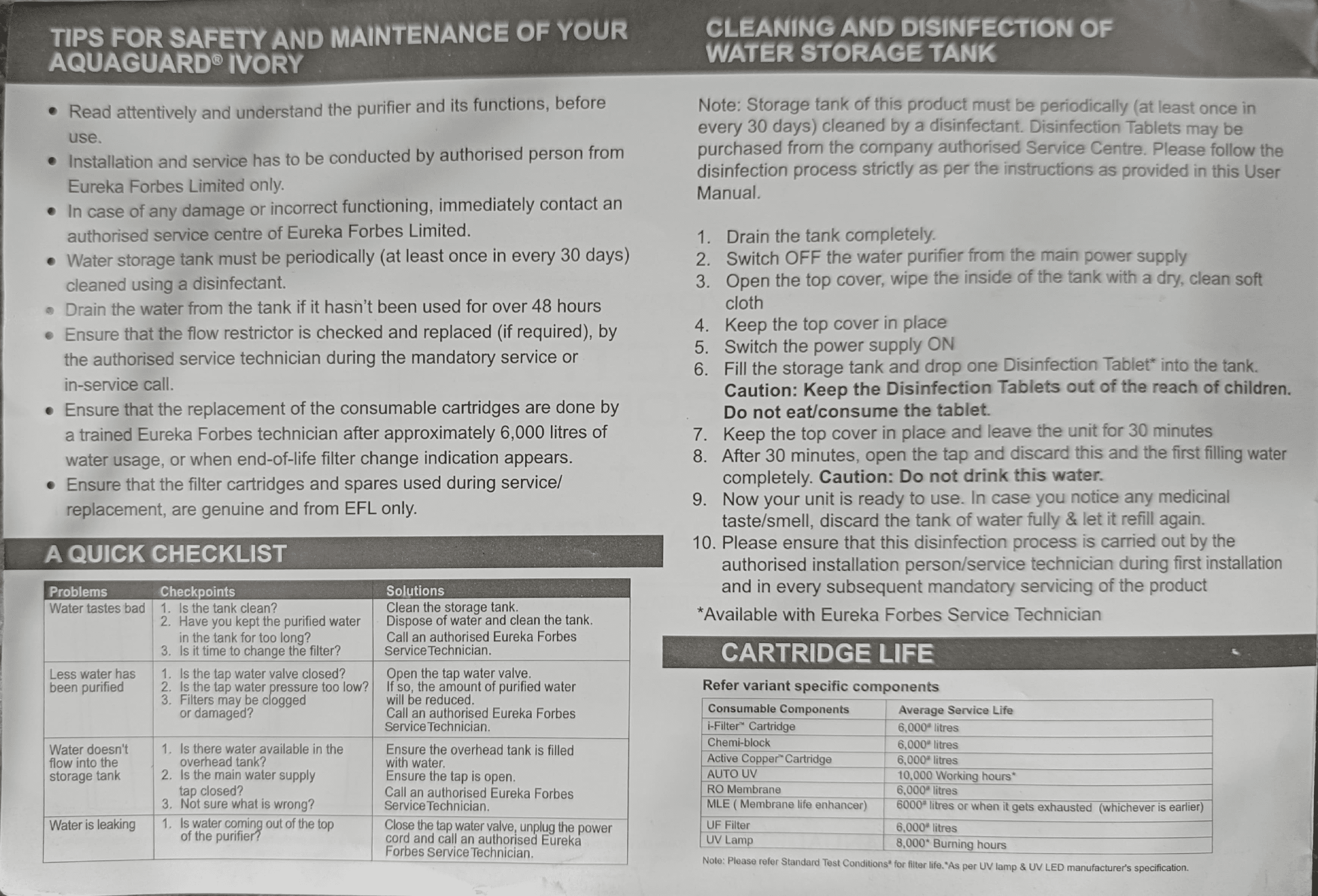
Step 1: Drain the tank completely. Open the water tap and let all stored water run out. This removes any accumulated sediment, debris, and existing microbial colonies. Don’t skip this—disinfectant works best on an empty tank where it can contact all interior surfaces.
Step 2: Switch OFF the water purifier from the main power supply. Unplug the unit or turn off the main switch. This is a critical safety step before opening the tank cover and handling disinfectant tablets. Never work with the unit powered on.
Step 3: Open the top cover. Carefully remove the top cover of the 7-liter storage tank. Set it aside safely on a clean surface.
Step 4-5: Cleaning and cover replacement
Step 4: Wipe the inside of the tank with a dry, clean soft cloth. Use gentle pressure to remove any visible dust, sediment, or residue from the tank walls and bottom. A dry cloth is specified because moisture can interfere with disinfectant effectiveness. Don’t use water at this stage—work with the tank dry. Pay special attention to corners and seams where algae and bacteria hide.
Step 5: Keep the top cover in place. After wiping, put the cover back on. This prevents dust or contaminants from falling into the tank while you prepare to add the disinfectant tablet.
Step 6: Adding disinfection tablet safely
Step 6: Switch the power supply ON and fill the storage tank, then drop one Disinfection Tablet into the tank. Turn the purifier back on and let the tank fill to capacity with purified water. Once full, carefully add a single disinfection tablet (available from authorized Eureka Forbes Service Centers). Drop it directly into the tank—don’t crush, dissolve in water beforehand, or handle it excessively. The tablet will dissolve naturally in the water. Caution: Keep the Disinfection Tablets out of the reach of children. Do not eat/consume the tablet. Store tablets in a locked cabinet away from children and pets.
Step 7-10: Waiting, draining, and final rinse
Step 7: Keep the top cover in place and leave the unit for 30 minutes. This contact time allows the disinfectant to circulate through the tank and eliminate bacteria, viruses, and algae. Don’t disturb the unit or open the tap during this period. The disinfectant needs uninterrupted time to work effectively.
Step 8: After 30 minutes, open the tap and discard this and the first filling water completely. This water contains dissolved disinfectant residue and must not be consumed. Let it drain fully. Caution: Do not drink this water. Continue draining until the tank is empty.
Step 9: Allow the unit to refill automatically. Switch the purifier on and let it fill the tank with fresh purified water. This second fill cycles clean water through the system and removes any remaining disinfectant traces.
Step 10: Your unit is ready to use. In case you notice any medicinal taste or smell in the water, drain the tank completely and let it refill again. Most medicinal tastes disappear after one cycle, but a second drain-and-refill ensures complete disinfectant removal. Please ensure this disinfection process is conducted by the authorized installation person or service technician during first installation and in every subsequent mandatory servicing.
Important Safety Precautions with Disinfection Tablets
Keeping tablets away from children
Disinfection tablets are chemical compounds designed to kill microorganisms—they are toxic if ingested. Store tablets in their original container in a locked cabinet, high shelf, or drawer that children cannot access. Never leave tablets sitting near the water purifier where curious children might find them. Educate family members that these are not candy or medicine, but disinfectants that can cause serious harm if swallowed. If a child ingests a tablet, contact poison control or seek emergency medical attention immediately.
Avoiding direct consumption or ingestion
Never dissolve tablets in your mouth, touch your face immediately after handling tablets, or allow tablets to contact food preparation surfaces. Wash your hands thoroughly with soap and water after handling disinfectant tablets. If you accidentally ingest any residue or taste disinfectant during the disinfection process, do not panic—the amount in tank water after proper draining is negligible. However, always drain and discard the first tank of water after adding a tablet. The manual is explicit: Do not eat/consume the tablet and Do not drink this water immediately after disinfection.
Discarding contaminated water properly
Water drained during the disinfection process (steps 1 and 8) should be discarded down a sink or drain, not used for plants, cleaning, or any other purpose. Once the tablet has dissolved and the water has been sitting in the tank for 30 minutes, it contains active disinfectant residue that can affect plants and may leave residue on surfaces. Drain it completely and safely. Never reuse this water for cooking, cleaning dishes, or watering indoor plants. Only after the second fill (step 9) and complete drain is the water safe for all uses.
What medicinal taste indicates during disinfection
A bitter, chemical, or medicinal taste appearing in water after disinfection is normal and indicates residual disinfectant—not a system failure. This taste should disappear after you drain the tank once and refill it. If the taste persists after a second drain-and-refill cycle, contact an authorized Eureka Forbes Service Technician. Persistent medicinal taste might indicate contamination that requires professional inspection or filter changes. Never ignore this symptom—it’s your system’s way of signaling that something needs attention.
Monthly Maintenance Schedule and Best Practices
Frequency: Every 30 days disinfection requirement
Set a calendar reminder for the first of every month or 30 days after your last disinfection. This is not a suggestion—the manual specifies at least once in every 30 days as a mandatory requirement. Monthly disinfection prevents the buildup of bacteria, algae, and biofilm that compromise water safety and taste. If you live in a region with higher water contamination or algae presence, consider disinfecting every 2-3 weeks. Keep a log of disinfection dates so you never miss a cycle.
Additional care between disinfection cycles
Between monthly disinfections, practice these care habits: Drain the water from the tank if it hasn’t been used for over 48 hours. Standing water in the tank becomes stagnant and develops off-odors and tastes. If your purifier hasn’t dispensed water in 2 days, empty the tank completely before using it again. This takes 2-3 minutes but prevents serving stagnant water to your family. Keep the tank cover clean and dust-free—debris on the cover can fall into the tank when opened. Check the tank visually for any visible algae (greenish tint) or sediment. If you see discoloration, perform an immediate disinfection rather than waiting for the monthly cycle.
Monitoring for water taste or smell changes
Your family’s taste buds are your first alert system. Bad water taste, metallic flavor, musty smell, or unusual odor means the tank needs disinfection—don’t wait for the monthly deadline. These changes indicate bacterial or algal growth, which accelerates rapidly once it starts. Similarly, if water appears cloudy or discolored, stop using it and contact Eureka Forbes. A sudden change from clear to cloudy water can indicate filter saturation or tank contamination. The manual’s Quick Checklist identifies bad taste as a primary problem and recommends cleaning the storage tank as the first solution.
Signs you need immediate professional service
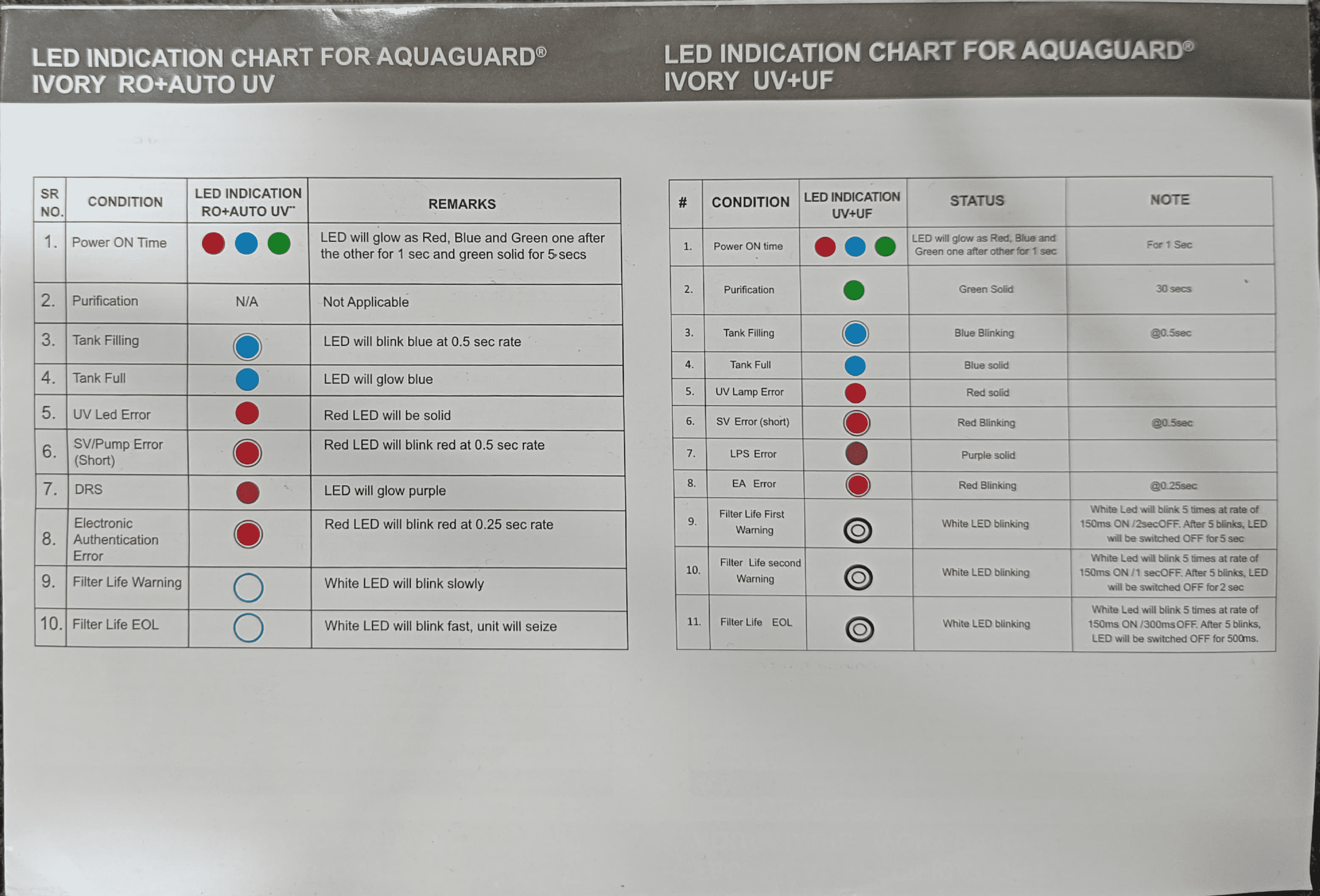
Contact an authorized Eureka Forbes Service Technician immediately if: (1) Medicinal taste persists after two complete drain-and-refill cycles following disinfection; (2) Water leaks from the tank or purifier body; (3) The white LED blinks fast (filter life end-of-life indication for RO+AUTO UV model, or white LED blinks 5 times at rapid rate for UV+UF model), meaning filters must be replaced; (4) Red LED glows solid or blinks, indicating UV or pump errors; (5) Water output drops significantly despite recent filter changes; (6) Visible mold, slime, or heavy algae growth inside the tank despite monthly disinfection. Never attempt to repair the purifier yourself—installation and service must be conducted by authorized Eureka Forbes personnel only.
Troubleshooting: Bad Water Taste After Disinfection
Medicinal taste indicating residual disinfectant
If water tastes medicinal, bitter, or chemical after disinfection, this is residual disinfectant—the tablet hasn’t been fully flushed from the system. This is expected and temporary. The disinfectant tablets used by Eureka Forbes are safe at this concentration (they’re food-grade disinfectants), but the taste is unpleasant. To eliminate it, proceed directly to the next troubleshooting step: drain and refill. Do not add another tablet or adjust settings. The taste will vanish with one complete tank drain-and-refill cycle.
Complete tank drainage and refilling solution
Follow this exact sequence: (1) Turn the purifier on and open the tap to drain the tank completely. Let it run for 2-3 minutes until no water flows. (2) Close the tap. (3) Turn the purifier back on and let it fill with fresh water—this takes 5-10 minutes depending on input water pressure and tank size. (4) Once the blue LED glows solid (indicating tank full on RO+AUTO UV model) or tank is visibly full, wait 2 minutes, then dispense one glass and taste it. (5) If medicinal taste is gone, your unit is ready to use normally. (6) If taste persists, repeat the drain-and-refill cycle one more time. Persistent taste after two cycles indicates a different problem requiring professional service.
When contamination requires filter change
Bad water taste sometimes indicates that filters, not the tank, are saturated. The manual specifies filter replacement after approximately 6,000 litres of water usage, or when end-of-life filter change indication appears. For RO+AUTO UV model, a white LED blinking slowly indicates first filter warning; white LED blinking fast signals end-of-life, and the unit will seize. For UV+UF model, white LED blinks 5 times at 150ms ON / 25ms OFF rate for first warning, then 5 times at 150ms ON / 1 sec OFF rate for second warning, then 5 times at 150ms ON / 300ms OFF rate for end-of-life. When these indicators appear, contact an authorized technician immediately—continue using the purifier until service arrives, but don’t delay. Delayed filter replacement reduces purification effectiveness and can cause bad taste or odor. Ensure replacement cartridges are genuine and from EFL only—non-genuine cartridges may not purify water properly and can trigger the Health Protect system, which electronically authenticates filters.
Contacting Eureka Forbes if issues persist
If bad water taste persists after disinfection, drain-and-refill cycles, and visual inspection confirms filters aren’t near end-of-life, contact Eureka Forbes immediately. Call 18602661177, SMS ‘REQ‘ to 80822 99333, or email [email protected]. Describe the taste (medicinal, metallic, musty), when it started, and what troubleshooting you’ve attempted. An authorized service technician will diagnose whether the issue is tank contamination, a failing filter, mineral buildup, or another mechanical problem. Do not use workarounds like adding more disinfectant tablets—this can make the taste worse. Professional service ensures proper diagnosis and genuine replacement parts.
Key Maintenance Specifications at a Glance
| Consumable Component | Service Life | Replacement Indicator |
|---|---|---|
| i-Filter™ Cartridge | 6,000 litres | White LED blinking (RO model) or White LED 5 blinks (UV+UF model) |
| Chemi-block | 6,000 litres | White LED blinking |
| RO Membrane | 6,000 litres (or 1 year, whichever earlier) | White LED blinking or reduced water output |
| UF Filter | 6,000 litres | White LED blinking |
| Active Copper™ Cartridge | 6,000 litres | White LED blinking |
| AUTO UV LED (RO model) | 10,000 working hours | Red LED solid (UV error) |
| UV Lamp (UV+UF model) | 8,000 burning hours | Red LED solid (UV error) |
| Disinfection Tablets | Monthly use | Purchase from authorized service center as needed |
Warranty Coverage for Disinfection and Maintenance
Your Aquaguard Ivory comes with a 12-month warranty from installation (or 15 months from purchase, whichever is earlier), covering defects in design, workmanship, and materials. However, the warranty does not cover consumable components like i-Filter, Chemi-block, RO Membrane, UF Filter, Membrane Life Enhancer, and Active Copper cartridge, which are subject to normal wear and tear. The RO Membrane has a separate 1-year warranty (or 6,000 liters, whichever is earlier) from installation, and if it clogs within warranty, it will be cleaned or replaced free of charge after inspection by an authorized technician.
Warranty coverage does not extend to defects caused by negligence, abuse, misuse, faulty care or maintenance. This means skipping monthly disinfections, ignoring bad water taste warnings, or delaying filter replacements can void warranty coverage if they cause damage. Regular disinfection and maintenance protect your warranty and ensure your purifier functions correctly for years. After warranty expires, you can opt for a yearly Service Contract at prevailing company rates, or pay for individual service calls on an actual labor-and-parts basis.
FAQ Section
How often should I disinfect my Aquaguard Ivory storage tank?
The manual specifies that your water storage tank must be cleaned using a disinfectant at least once every 30 days—this is a mandatory maintenance requirement, not optional. Set a monthly calendar reminder for the same date each month. If you notice bad water taste, musty smell, or visible discoloration before the 30-day mark, disinfect immediately. In regions with higher algae presence or during rainy seasons, consider disinfecting every 2-3 weeks as a precaution.
Can I drink water immediately after adding a disinfection tablet?
No, absolutely not. After adding a disinfection tablet and waiting 30 minutes, you must drain the entire tank and discard that water completely—do not drink it. The water contains active disinfectant residue. Allow the purifier to refill automatically with fresh purified water. If you notice a medicinal taste in the water after this refill, drain and refill one more time. Only after the second fill cycle is the water completely safe to drink.
What does a medicinal taste mean, and how do I fix it?
A medicinal, bitter, or chemical taste after disinfection means there is residual disinfectant in the tank—this is normal and temporary. It does not indicate a failed purifier or contaminated water; it simply means the disinfectant hasn’t been completely flushed. To fix it: drain the tank completely by opening the tap, allow the purifier to refill with fresh water, and taste the water after the tank is full. The taste should disappear. If medicinal taste persists after a second drain-and-refill cycle, or if you notice it weeks after disinfection, contact an authorized Eureka Forbes Service Technician.
What should I do if I haven’t used my Aquaguard Ivory for 2 days?
If the purifier has not dispensed water for over 48 hours, drain the tank completely before using it again. Standing water becomes stagnant and develops off-odors and off-tastes. Simply open the tap and let all stored water run out, then turn the purifier back on to refill with fresh purified water. This takes 2-3 minutes and ensures you’re drinking fresh, oxygenated water rather than stale tank water.
When should I replace my Aquaguard Ivory filters, and what LED indicators tell me it’s time?
Filters need replacement after approximately 6,000 liters of water usage or when your purifier’s LED indicates end-of-life, whichever comes first. For RO+AUTO UV models, a white LED blinking slowly means first filter warning, and white LED blinking fast means end-of-life (unit will seize). For UV+UF models, white LED blinks 5 times at increasing intervals as the filter approaches end-of-life. Never ignore these LED warnings. Contact an authorized Eureka Forbes technician immediately when you see filter warnings. Continuing to use an exhausted filter reduces purification effectiveness and can cause bad water taste or contamination.
Following this exact Aquaguard Ivory water tank disinfection cleaning procedure every 30 days ensures your purified water stays safe, fresh-tasting, and free from bacterial and algal contamination. The 10-step process takes less than an hour and protects your investment in this sophisticated multi-stage purification system. Monthly disinfection, combined with prompt filter replacements and immediate attention to taste or odor changes, keeps your Aquaguard Ivory performing at peak efficiency for years of healthy drinking water.