
Your Eureka NEN110 suddenly stops mid-cleaning because of the thermal cutoff system—a safety feature that automatically shuts down the motor when it overheats. The three main culprits are a full dust cup, a blocked filter, or an obstructed hose. This guide walks you through diagnosing the problem and getting your vacuum back to work in as little as 30 minutes.
Understanding the Thermal Cutoff System
What is a thermal cutoff and why vacuums need it
A thermal cutoff is a safety device that automatically stops your vacuum’s motor when internal temperatures exceed safe limits. Think of it as an automatic circuit breaker for heat. Without it, an overheating motor could catch fire, melt internal components, or create an electrical hazard. Your Eureka NEN110 has a built-in thermostat that detects dangerous temperature spikes and kills power instantly.
How the Eureka NEN110 thermostat protects your motor
The NEN110’s thermostat continuously monitors motor temperature during operation. The moment heat levels rise above the safe threshold—typically from restricted airflow—the thermostat triggers an automatic shutoff. This is not a malfunction; it’s your vacuum protecting itself. According to the manual, the thermal cutoff activates when the vacuum encounters conditions like a full dust cup, blocked hose, or clogged filter that prevent air circulation needed to cool the motor.
Normal operation vs. overheating conditions
Normal operation means steady suction with unrestricted airflow through the dust cup and filter. Overheating happens when resistance builds up—dust piles up in the cup, filter gets clogged with fine particles, or the hose develops a blockage. Each restriction forces the motor to work harder and heat up faster. The thermostat detects this heat increase and cuts power to prevent damage.
Why Your Eureka NEN110 Suddenly Stops
Motor overheating as the primary cause
When your NEN110 shuts off without warning, the motor has reached a dangerous temperature. This always stems from restricted airflow. Airflow keeps the motor cool during operation. Once something blocks that airflow, heat builds rapidly, and the thermostat responds by shutting everything down. The vacuum isn’t broken—it’s protecting itself from catastrophic damage.
How full dust cups trigger shutdown
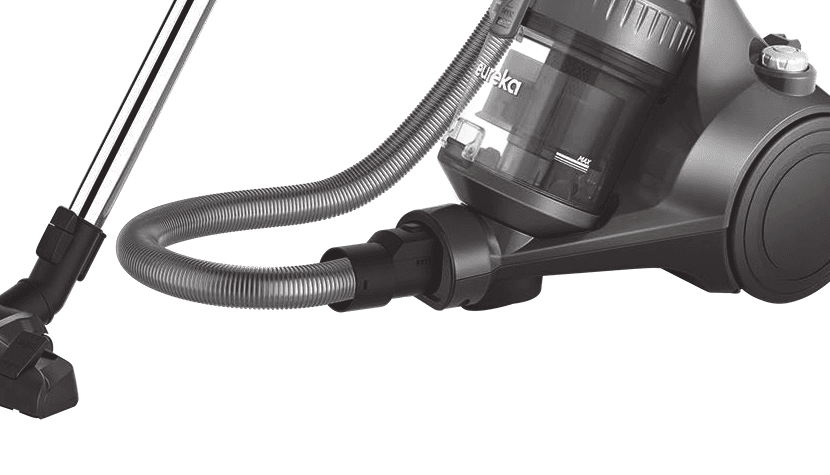
The dust cup is the first line of defense for filtration. When dust reaches the maximum fill line, suction drops dramatically because air can’t pass through the packed debris. This restriction forces the motor to pull harder, generating excess heat. The manual explicitly warns: empty the dust cup after each use and whenever dust reaches the max fill line. A full cup is the most common cause of thermal shutoff in the NEN110.
Blocked filters and clogged hoses reducing airflow
The sponge filter in your NEN110 requires monthly cleaning—or more often with heavy use. Dust accumulation on the filter surface reduces airflow the same way a clogged car air filter reduces engine performance. Similarly, a kinked hose or debris lodged inside creates a bottleneck that forces the motor to strain. Both situations trap heat and trigger the thermostat cutoff.
Suction inlet blockages in brush or accessories
Sometimes a large piece of debris gets stuck in the floor brush’s suction inlet or in the hose connection points. This blocks airflow at the source, before it even reaches the motor. Hair wrapped around the brush bristles can also reduce suction and create resistance that causes overheating.
Immediate Steps When Vacuum Shuts Off
Turn off power switch immediately
When the thermal cutoff activates, your vacuum’s power is already off. However, follow the manual’s instruction: push the on/off switch to off (0) to ensure it’s completely disabled. Do not attempt to restart it immediately.
Unplug from electrical socket
After switching off the power, unplug the power cord from the wall socket. This removes all electrical power to the unit and prevents accidental restart. The manual is explicit: this is a mandatory safety step before you touch anything inside the vacuum.
Let the vacuum cool naturally (no water or forced cooling)
Your NEN110 needs time for the motor to cool down. Do not spray water on it, do not use ice, and do not use compressed air to force cooling. These methods can damage electrical components or push moisture into the motor. Just let it sit unplugged in a dry space.
Do NOT attempt to restart within 30 minutes
The manual is clear: wait at least 30 minutes before attempting to use the cleaner. This gives the internal components time to return to a safe operating temperature. If you cleaned the wrong part or cleaned a component that’s still wet, wait 24 hours for complete drying before reinserting filters into the machine.
Diagnosing the Root Cause
Checking if the dust cup is at maximum fill
The dust cup has a maximum fill line marked inside. Check whether dust has reached or exceeded this line. If yes, the cup is full. A full dust cup reduces efficiency and is the single most common cause of thermal shutdown in the NEN110. Empty it completely before restarting.
Inspecting for blocked or clogged filters
The sponge filter sits inside the top cover of the dust cup. According to the manual, filters require monthly cleaning or more depending on use frequency. To inspect it:
1. Pull on the dust cup lid clip and lift the cover upwards.
2. The filter is located inside. Look for visible dust buildup on the sponge surface.
3. If the filter appears dark or heavily coated with dust, it’s clogged and needs cleaning immediately.
Testing the hose for obstructions
Hold the hose up to a light and look through it from both ends. Check for:
• Large debris (hair clumps, dust balls, or objects stuck inside)
• Kinks or crushing that blocks the interior
• Water or moisture inside (sign of improper cleaning)
• Detachable hose sections that may be loose or not fully connected
Examining the floor brush and nozzle suction inlet
The suction inlet on the floor brush is where air enters. Check for hair wrapped around bristles, debris packed into the inlet opening, or blockages in the connection point between the brush and wand. These are easy to miss but create significant airflow restriction.

How to Empty the Dust Cup Correctly
Pressing the dust cup release button
Located on the side of the vacuum, the dust cup release button unlocks the cup from the main body. Press it firmly and the cup will separate. The manual emphasizes: always turn off and unplug the vacuum before removing the dust cup.
Bringing cup to trash over a receptacle
Carry the dust cup directly over your trash bin or receptacle. Do not squeeze or tap the cup over your floor—dust will escape and scatter. The cup contains all the debris you’ve collected, so contain it completely.
Opening the lower lid to empty debris
The dust cup has a lower lid on the bottom. Press the release button on this lid and it swings open. Gravity does the work here—the dust will fall directly into your trash receptacle. Do not shake the cup or bang it. Simply open the lid and let the dust drop.
Closing and reinserting the cup securely
Close the lower lid by pressing it shut until it latches. Return the dust cup to the vacuum cleaner. The manual specifies: place the dust cup back into the vacuum cleaner until a click is heard. This click indicates the cup is fully seated and locked in place. Never operate the NEN110 without the dust cup fully inserted.
Cleaning a Blocked Filter (Emergency Fix)
Quick dust removal by tapping over a bin
For quick maintenance (when you notice reduced suction but the vacuum still runs), tap the filter over a trash bin. Hold the filter housing handle and tap the sponge gently on the bin’s rim. This dislodges loose dust buildup. Do this every few uses to keep the filter from getting completely clogged.
When to do a full 24-hour wash cycle
When the filter is heavily clogged or the thermal cutoff has activated, you need a deep clean. According to the manual:
1. Remove the filter by pulling on the dust cup lid clip and lifting the cover upwards.
2. Pull on the filter housing handle and remove it.
3. Take the sponge filter out of the filter housing.
4. Wash the filter under water (maximum 40 degrees). Do not use detergents.
5. Leave it out to dry for 24 hours or until fully dry before placing it back in the vacuum.
This full wash removes embedded dust that tapping cannot dislodge. Do not reinstall a wet filter—it will create moisture problems and trigger thermal shutdown again.
Why filter blockage causes thermal shutdown
A clogged filter is a primary cause of the thermal cutoff activation. The filter is the final barrier before air exits the motor housing. When dust clogs it, air can’t escape, pressure builds, and heat gets trapped around the motor. The thermostat detects this heat spike and shuts everything down.
Impact of filter cleaning on cooling time
After cleaning a clogged filter, the motor can operate normally again. However, if the filter was wet when you cleaned it, you must still wait 24 hours for it to dry completely before reinstalling. The manual is explicit about this extended wait time. Reinstalling a damp filter will trigger thermal shutdown immediately when you restart the vacuum.
Clearing Hose and Suction Line Blockages
Detaching the hose from the air inlet
The hose attaches to the front of the vacuum at the air inlet. According to the assembly instructions: twist to the left and pull to detach. Once removed, hold it up to a window or light source and look through both ends. You should see clear light coming through if the hose is unobstructed.
Visual inspection for debris or kinks
Check for:
• Large objects (pet toy, coin, piece of string) visibly lodged inside
• Crushed or collapsed sections that narrow the interior
• Permanent kinks from being bent sharply
• Moisture or water inside, which indicates improper cleaning or wet debris pickup
How to safely remove stubborn clogs
If you spot a blockage, use a straightened wire coat hanger or a plumbing snake to push it through. Do not use sharp metal objects that might puncture the hose. If the clog is near one end, you can often push it out with a broom handle. Work from the opposite end to push the debris out, never pull it back toward the motor side.
Testing suction after clearing blockage
After clearing the hose, reattach it to the air inlet and twist to the right until snug. The manual says to attach the hose by inserting it into the air inlet and twisting to the right. Before plugging in and restarting, run your hand over the hose’s exterior to feel for pinches or kinks. Squeeze the hose gently along its length—it should compress and then spring back. If any section stays crushed, that’s a blockage or internal damage.
The 30-Minute Cool-Down and Reset
Why 30 minutes minimum is required
The manual specifies: wait at least 30 minutes before attempting to use the cleaner. This timeframe allows the motor’s internal components to return to room temperature. Electric motors generate tremendous heat during operation. Once the thermostat cuts power, residual heat is still present in the motor windings and housing. Thirty minutes is the minimum safe interval for this heat to dissipate naturally.
What to do during the cooling period
Use this time productively:
• Empty and inspect the dust cup (if you haven’t already)
• Remove and tap clean the filter
• Inspect the hose for blockages
• Check the floor brush for hair or debris
• Clean any accessories that might have reduced suction
• Let wet filters air-dry if you washed them (though full drying takes 24 hours)
Do not attempt to use the vacuum, restart it, or check if it’s cool enough by plugging it in before the 30 minutes are up.
Proper restart procedure after cooling
After 30 minutes have passed and you’ve fixed the root cause:
1. Plug the cleaner back in to an electrical outlet.
2. Push the on/off switch on (1) to start the motor.
3. Listen for the motor to spin up normally—you should hear a smooth, steady sound.
4. Test suction with your hand at the hose end—it should feel strong.
5. Begin vacuuming. If the vacuum shuts off again within minutes, the root cause was not fixed or there’s a different blockage.
Extended 24-hour cooling if you cleaned wrong area
The manual specifies an important exception: if you have cleaned the incorrect space, please wait 24 hours for the filters to fully dry before putting them back into the machine. This means if you washed the filter to clean it but didn’t let it dry completely, or if you accidentally got the motor housing wet during maintenance, you must wait a full day. Moisture near electrical components creates shock hazards and can cause thermal shutdown repeatedly.
Preventing Future Thermal Cutoff Events
Empty the dust cup after every use
The manual emphasizes: empty the dust cup after each use. Also be sure to empty the dust cup anytime dust reaches the max fill line. This is the single most important maintenance step. A full cup is the most common cause of thermal shutdown. Make it a habit to empty the cup immediately after vacuuming, while you’re still at the trash can. This takes 30 seconds and prevents overheating.
Monthly filter cleaning schedule
According to the manual: sponge filters require cleaning on a monthly basis (or more depending on use frequency). Set a calendar reminder for the first of each month to tap your filter over a trash bin. If you have pets, allergies, or vacuum more than 2-3 times per week, increase this to every 2 weeks. Heavy use kicks up more fine dust that clogs the filter faster.
Regular hose inspection for blockages
Once a month, detach the hose from the air inlet and look through it. Check for kinks, crushing, or debris. Feel along the hose’s length for soft spots or collapsed sections. A kinked hose is easy to overlook because you can’t see inside it, but it starves the motor of cooling air just as much as a dust cup blockage.
Proper floor mode switching (carpet vs. hard floors)
The NEN110 has a floor mode switch on the nozzle. The manual explains: there’s a switch located on the floor nozzle that can be pressed with your foot to switch between floor modes. Position 1 extends bristles for hard floors. Position 2 retracts bristles for carpet. Using the wrong mode increases drag and motor strain. If you vacuum both carpet and hard floors in one session, switch the mode when you transition between surfaces. This reduces unnecessary strain on the motor and keeps it cooler.
When to Contact Eureka Customer Service
If vacuum still won’t restart after 30 minutes
You’ve waited 30 minutes, emptied the dust cup, cleaned the filter, and cleared the hose, but the vacuum still won’t start or shuts off again immediately. This indicates either a deeper internal issue or the thermostat is stuck. Contact the Eureka Customer Service HELPLINE at 1-800-282-2886. This is covered under the standard warranty if you’ve followed proper maintenance procedures.
Persistent thermal cutoff after fixes
If the thermal cutoff activates repeatedly even after you’ve thoroughly cleaned everything and confirmed there are no blockages, something is wrong inside the motor or thermostat. Do not continue using the vacuum—repeated thermal events indicate a failing component. Call Eureka’s service line and describe the issue. They may authorize a repair or replacement depending on your warranty status and purchase date.
Motor damage or burning smell indicators
Stop using the vacuum immediately if you notice:
• A burning smell coming from the motor housing
• Visible smoke or sparks when you turn it on
• The motor making grinding, squealing, or loud rattling sounds
• The motor not spinning up at all (just humming or clicking)
• A plastic or electrical burning odor from the dust cup area
These are signs of motor damage or electrical failure. Do not attempt to restart or troubleshoot. Unplug the vacuum, let it cool completely, and contact Eureka customer service at 1-800-282-2886 or email [email protected].
Warranty coverage for thermal failures
Your Eureka NEN110 comes with a one-year limited warranty from the date of original purchase. The warranty covers defects in material and workmanship under normal household usage and proper maintenance. It does not cover:
• Normal wear and tear (filters, belts, brushes require periodic replacement)
• Damage from improper maintenance or failure to follow instructions
• Excess moisture, corrosive environments, or power surges
• Unauthorized repairs
If the thermal cutoff activates due to your own negligence (ignoring a full dust cup repeatedly), that’s normal wear. But if the vacuum has a faulty thermostat or motor defect that causes repeated thermal shutdown despite proper maintenance, Eureka will repair or replace it under warranty. Always keep your receipt and proof of purchase. Contact customer service with your model number, type, and serial number (located on the bottom of the cleaner). Eureka will pay return shipping for warranty repairs; you pay initial shipping costs.

Frequently Asked Questions
Can I restart the vacuum before 30 minutes if I fixed the problem?
No. The manual is explicit: wait at least 30 minutes before attempting to use the cleaner. The 30-minute period is required for the motor’s internal components to cool down, regardless of whether you’ve fixed the blockage. Restarting too early risks triggering the thermal cutoff again because the motor is still hot. After you fix the root cause (empty the cup, clean the filter, clear the hose), set a timer and wait the full 30 minutes before plugging in.
Is it normal for the vacuum to shut off if I vacuum for a long time?
If the vacuum shuts off after 2-3 hours of continuous use, that’s not normal—it indicates the thermal cutoff is activating from sustained heat buildup. This usually means:
• The dust cup is filling up during the session and reducing airflow
• The filter is already clogged before you start
• There’s a partial blockage in the hose that you’re not aware of
Empty the dust cup after each room, not just after the entire cleaning session. Clean the filter monthly as scheduled. If the vacuum still shuts off during normal use after these steps, call Eureka service—it may indicate a failing thermostat.
What if the vacuum won’t turn off—is there a separate reset button?
Your NEN110 does not have a separate reset button. The thermal cutoff is automatic. If the vacuum shuts off due to overheating, it will not restart until you’ve waited 30 minutes AND unplugged it. The combination of the power switch being off and the plug being removed from the outlet fully resets the system. You cannot override or manually reset the thermostat—it operates on heat-sensing only.
Can I run the vacuum without the filter to make it cooler?
No. Do not operate the vacuum cleaner without the sponge filter in place. The manual is explicit about this. Without the filter, unfiltered air goes directly to the motor, which damages the motor bearings and internal windings. It also fails to catch dust, which gets sucked into the motor and causes clogs. The filter is essential for both cooling and protection. Always reinstall it after cleaning, even if it’s still slightly damp from rinsing (though you should wait 24 hours for full drying).
Can I use an extension cord with my NEN110?
The manual warns: do not use extension cords or outlets with inadequate current carrying capacity. This is especially important for a motor-driven appliance like the NEN110, which draws significant power. Extension cords cause voltage drops that can prevent proper motor cooling. Plug the vacuum directly into a wall outlet that matches your supply voltage. If you must use an extension cord, use a heavy-gauge, short cord rated for high-current appliances—but direct connection is always safer.