
If your EyeVac Home has lost suction power or isn’t picking up debris like it used to, dirty filters are almost always the culprit. The EyeVac Home touchless vacuum relies on three separate filters to maintain strong airflow, and when any of them get clogged with dust and debris, performance drops noticeably. This guide walks you through cleaning each filter properly so you can restore full suction power.
Why Your EyeVac Home Lost Suction Power
How dirty filters reduce performance
The EyeVac Home pulls air through three different filter stages. As debris accumulates on these filters, the motor has to work harder to pull air through the blockages. This doesn’t just reduce suction—it can eventually strain the motor and prevent the unit from operating at all. Cleaning the filters regularly restores the airflow path and brings suction back to normal levels.
Three filters that affect suction
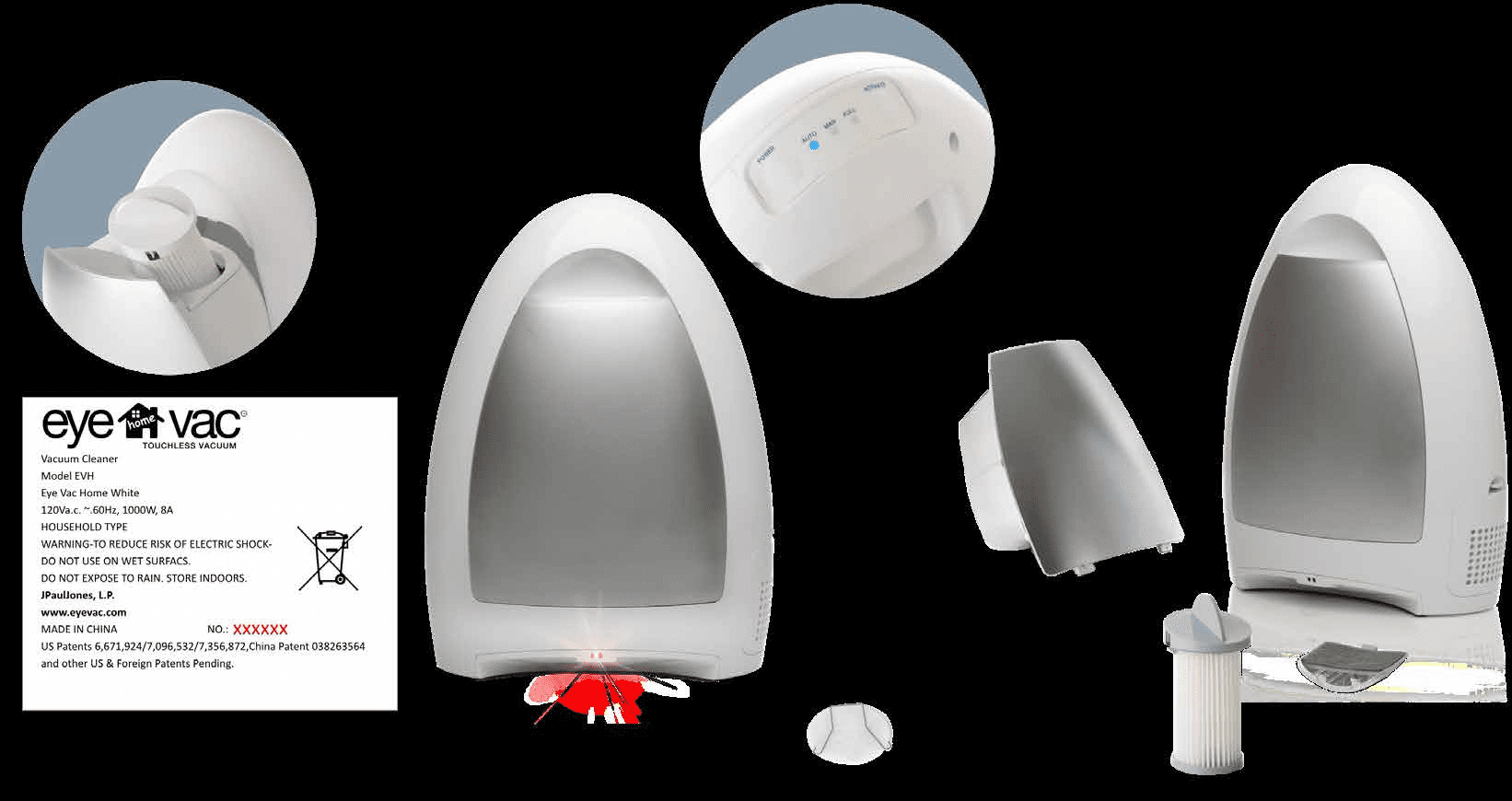
Your EyeVac Home has three distinct filters, each serving a critical function:
- Pre-Motor Filter: Located on top of the canister, this filter sits directly in the path of debris and gets dirty fastest
- Exhaust Filter: Mounted on the side of the unit, this filter protects the motor by filtering air before it exits
- Vent Filter: Positioned underneath the canister in the main cavity, this filter ensures proper airflow through the system
All three must be clean for the EyeVac Home to maintain strong suction. Even one dirty filter can noticeably reduce performance.

Cleaning the Pre-Motor Filter: Complete Guide
The Pre-Motor Filter is the primary filter and gets the dirtiest fastest because it sits directly above the canister where debris collects. This is the filter you’ll clean most frequently when you notice weak suction.
Step-by-step removal and cleaning process
Start by turning off the EyeVac Home completely and unplugging it from the wall outlet. This is essential before any maintenance work. Next, grasp the Canister Grip firmly and pull the canister outward from the front of the bin cavity. Lift it straight out and away from the main unit.
Once you have the canister removed, you’ll see the Pre-Motor Filter Handle sticking up from the top. This is your grip point for removal.
Counter-clockwise unlock technique
Grasp the Pre-Motor Filter Handle and turn it counter-clockwise until it reaches the unlock position. Don’t force it—rotate it smoothly until you feel it stop. Once unlocked, pull the filter straight up and out of the top of the canister. The filter should come out cleanly without resistance.
Take the filter to your sink and rinse it thoroughly under running water. The water should flow through the filter media freely. If there’s stubborn buildup, use a soft-bristled brush and mild soap to gently scrub the surface. Avoid using harsh chemicals or stiff brushes, as these can damage the filter material.
Drying requirements before reinstallation
This step is critical: the filter must be completely dry before you reinstall it. Water left on the filter reduces suction and can damage the motor. Stand the filter upright and let it air dry completely, which typically takes 2–4 hours depending on humidity. You can place it in a warm area to speed up the process, but never use heat directly.
Once fully dry, slide the Pre-Motor Filter back into the top of the canister. Rotate it clockwise until it locks into the lock position. You should feel a slight resistance as it seats properly. The filter must be flush with the canister lid—there should be no gaps. Place the canister back into the EyeVac Home and you’re ready to test the suction improvement.
Cleaning the Exhaust Filter on the Side
The Exhaust Filter protects your motor by filtering air as it exits the unit. Located on the side of the EyeVac Home, it’s easy to access and clean regularly.
How to safely slide out the exhaust filter
You don’t need to unplug the unit for this task, but it’s good practice to power it off first. The Exhaust Filter is housed in a slot on the side of the unit. Gently grasp the top of the filter and pull it straight out of the filter holder using steady, even pressure. The filter slides out easily—there’s no locking mechanism to release first.
Proper washing and drying method
Hold the filter over your trash can and tap it gently against the edge to dislodge loose dirt and debris. Don’t hit it hard, as this can damage the filter media. Once you’ve removed the loose debris, take the filter to your sink. Wash it in warm water with mild soap, rinsing thoroughly until the water runs clear. Use your fingers or a soft brush to gently clean the surface if needed.
Air dry the Exhaust Filter completely before reinstalling it. Like the Pre-Motor Filter, moisture reduces suction and stresses the motor. Allow at least 2–4 hours for complete drying in a warm location.
Correct orientation when reinstalling
This is important: when you slide the Exhaust Filter back into the unit, the filter must face outward. The filter material should point away from the motor. Slide it back into the housing with steady pressure until it sits flush. You’ll know it’s positioned correctly when it doesn’t wiggle or shift.

Cleaning the Vent Filter Under the Canister
The Vent Filter is the most frequently overlooked filter because it’s hidden underneath the canister. However, it plays a crucial role in maintaining airflow through the system, and a dirty vent filter can significantly reduce suction.
Locating the spring-loaded vent filter
With the canister removed from the EyeVac Home, look into the bin cavity where the canister normally sits. The Vent Filter sits at the bottom of this cavity, held in place by a metal spring. You’ll see the spring directly above the filter, keeping it pressed against the bottom surface.
Safe removal without damaging the spring
This step requires care because the spring must stay attached and functional. Gently squeeze the spring inward toward the center, reducing the pressure it exerts on the filter. While keeping the spring squeezed, carefully lift and remove the vent filter. Take your time with this—forcing it can bend or break the spring.
Once removed, hold the Vent Filter over a trash can and tap it gently to release loose debris. Then wash it in warm water with mild soap, rinsing thoroughly. Use a soft brush if needed for stubborn buildup. Air dry completely before reinstalling—this typically takes 2–4 hours.
Ensuring secure reinsertion
When you’re ready to reinstall the Vent Filter, squeeze the spring inward again to create clearance. Place the clean, dry filter back under the spring in its original position. Release the spring slowly so it settles evenly on top of the filter. The spring should sit flat and centered on the filter surface. You’ll know it’s secure when the spring holds the filter firmly without gaps or movement.
Preventive Maintenance Schedule
How often to clean each filter type
The cleaning frequency depends on how often you use your EyeVac Home and how much debris you vacuum up:
| Filter Type | Cleaning Schedule | When Suction Drops |
|---|---|---|
| Pre-Motor Filter | Every 2–4 weeks of regular use | Immediately when suction weakens |
| Exhaust Filter | Every 3–6 weeks of regular use | When motor sounds strained |
| Vent Filter | Every 4–8 weeks of regular use | If suction doesn’t improve after cleaning pre-motor filter |
“Regular use” means operating the EyeVac Home 3–4 times per week. If you use it daily, clean the Pre-Motor Filter weekly and the other filters every 2–3 weeks. Light use (once or twice weekly) extends the cleaning intervals.
Signs that indicate filter cleaning is needed
You don’t have to wait for a scheduled time—watch for these warning signs that filters need cleaning:
- Suction power noticeably weaker than normal
- Motor sounds louder or more strained than usual
- Canister indicator light comes on before the canister feels full
- Status indicator light blinks when the unit is running
- Unit shuts down automatically during normal operation
Any of these symptoms indicate that at least one filter needs attention. Start with the Pre-Motor Filter since it’s the most common culprit, then work your way through the Exhaust and Vent Filters if needed.
Replacing filters vs cleaning them
The Pre-Motor, Exhaust, and Vent Filters are all cleanable and reusable. You don’t need to replace them unless the material itself becomes damaged—tears, cracks, or permanent staining that won’t rinse out. With proper cleaning and drying, these filters typically last for 2–3 years of regular home use.
If you do need replacement filters, they’re available through EyeVac’s Customer Service Department. When ordering, specify which filter type you need (Pre-Motor, Exhaust, or Vent). Always ensure replacement filters fit snugly in their holders before operating the unit.

When Suction Still Doesn’t Improve
You’ve cleaned all three filters and they’re completely dry, but suction still isn’t back to normal. There are a few other things to check before contacting support.
Checking for inlet blockages
The inlet is the opening where debris enters the unit. If a larger piece of debris got stuck in the inlet before you powered on the unit, it can block the entire airflow. Turn off and unplug the EyeVac Home. Look directly into the inlet opening at the front of the unit. If you see any debris, gently remove it by hand or with tweezers. Don’t probe too deeply into the inlet, as you might accidentally push debris further into the system.
Also check the path leading to the inlet. Make sure the area directly in front of the sensor is clear of dust and dirt buildup, as this can interfere with the unit’s ability to detect debris.
Inspecting sensors for debris
The EyeVac Home has sensors that detect sweeping motion in Auto Mode. If these sensors get covered with dust or debris, the unit may not activate properly or may shut down unexpectedly. With the unit unplugged, locate the sensors on the front face of the unit near the top. Gently wipe them clean with a warm, damp cloth or a Q-tip. Do not use soap, alcohol, or harsh chemicals on the sensors, as these can damage them.
If the Status Indicator Light blinks while the unit is running, it usually means the sensors have been inactive for 30 seconds and the motor has shut down automatically. This is often a sign that the Pre-Motor or Exhaust Filter needs cleaning.
Warranty coverage for performance issues
If you’ve cleaned all filters, checked for blockages, and the suction still isn’t strong, your unit may have an internal issue covered by warranty. EyeVac Home comes with a one-year limited warranty on manufacturing defects. The warranty covers defects in materials and workmanship from the date of purchase, including parts and labor directly related to the defect.
To start a warranty claim, visit eyevac.com/connect and fill out the Service Request form. Provide details about the issue, when you purchased the unit, and what troubleshooting steps you’ve already taken. You can also contact JPaulJones, LP at 512-485-3050 or write to them at 7500 Rialto Blvd., Bldg. 1, Suite 122, Austin, TX 78735.
Do not attempt to repair the unit yourself, as this will invalidate your warranty. Internal components are not user-serviceable, and opening the unit can cause damage.
Frequently Asked Questions
How long does it take for filters to air dry?
Pre-Motor, Exhaust, and Vent Filters typically take 2–4 hours to dry completely when air dried at room temperature. Speed up the drying process by placing filters in a warm area away from direct sunlight. Never use a hair dryer, heat gun, or direct heat source, as high temperatures can damage the filter material. Always verify that filters are completely dry before reinstalling them.
Can I use a dishwasher to clean the canister?
No. The canister should only be washed by hand in warm water with mild soap. Do not place the canister in the dishwasher, as the heat and harsh cycle can damage it. Rinse thoroughly after washing and allow it to air dry completely before reassembling and inserting it back into the EyeVac Home.
What should I do if the Pre-Motor Filter won’t unlock?
Make sure you’re turning the filter counter-clockwise, not clockwise. Apply steady, even pressure without forcing it—the rotation should be smooth. If the filter still won’t unlock, it may be stuck due to dirt or debris. With the filter in place, briefly run the unit in Manual Mode to circulate air and loosen any stubborn buildup, then unplug and try again. If it remains stuck, contact EyeVac Customer Service for assistance.
How do I know if the Vent Filter is damaged?
Inspect the Vent Filter carefully during cleaning. Look for visible tears, cracks, or holes in the filter material. Minor discoloration is normal and doesn’t indicate damage. If you find tears or holes, the filter should be replaced rather than reinstalled. A damaged filter allows unfiltered debris to reach the motor, which can cause internal damage.
Why is my EyeVac Home still not picking up debris after cleaning the filters?
If all three filters are clean and dry, the inlet or sensors may be blocked. First, check the inlet opening for any stuck debris and remove it by hand. Then clean the sensors with a damp cloth or Q-tip (no soap or alcohol). If suction is still weak, the canister may be full—empty it completely even if it doesn’t seem full. If the problem persists, contact EyeVac Customer Service to request warranty service at eyevac.com/connect.