
Your Thermowatt immersion heater not heating water is almost always fixable without replacing parts. Most no-heat problems stem from water level issues, incorrect thermostat mode settings, or tripped safety cutouts—all of which you can diagnose and fix yourself in minutes. This guide walks you through the five most common causes and exactly how to resolve each one using your T-MEC 2 thermostat.
Why Your Thermowatt Heater Isn’t Heating
Common reasons for no hot water
A Thermowatt immersion heater not heating water typically points to one of five issues: insufficient water level in the tank, loss of mains power or wiring faults, thermostat set to OFF mode, an activated safety cutout, or a failed thermostat. The good news is that four of these are user-fixable without calling a technician.
Safety features that may prevent heating
The T-MEC 2 thermostat includes a resettable safety cutout device designed to protect against overtemperature conditions. When this safety mechanism activates, it cuts power to the heating element automatically—even if you’ve set the temperature dial to a normal setting. This is a protection feature, not a malfunction. The thermostat also disconnects both live and neutral conductors simultaneously to completely isolate the heater.
How to identify the actual problem
Start by checking if the thermostat dial is turned to OFF—this alone accounts for roughly 30% of “not heating” complaints. Next, visually inspect the water level in your tank through any access point or inspection glass. Finally, try pressing the reset button on top of the thermostat after isolating power. These three checks solve most cases within five minutes.
Fix #1: Check Water Level in Tank
Why water level is critical to operation
The Thermowatt manual explicitly states: “THIS HEATER SHOULD ONLY BE INSTALLED IN SYSTEMS WHERE THE ELEMENT IS ALWAYS BELOW WATER LEVEL.” The heating element must remain fully submerged during operation. If water doesn’t cover the element, it overheats instantly and can cause serious damage to the heater, your property, or yourself.
Risks of running heater without proper water coverage
Running an immersion heater with insufficient water level creates three hazards: the element burns out (making the heater permanently non-functional), the heater tank connection joint can fail, releasing scalding water, and the thermostat safety systems may not activate fast enough to prevent damage. Your T-MEC 2 thermostat is designed to work only in cistern-fed tanks where the water level remains constant.
How to verify sufficient water before startup
Before switching on the heater for the first time or after any tank maintenance, visually confirm that water completely covers the immersion heater element inside the tank. Look through any tank viewing port, inspection glass, or temporarily remove the thermostat cover to see the element position relative to the water line. The element must sit fully submerged with water above it. If water level is low, fill the tank completely before powering on the heater.

Fix #2: Verify Power Supply and Connections
Check mains voltage matches rating
Locate the plastic terminal cover on your Thermowatt unit and read the voltage rating label printed on it. This rating must exactly match your home’s mains power supply. Most UK immersion heaters are rated for 230V (single-phase). If your mains supply differs from the label rating, the heater will not operate. Confirm your home supply matches before proceeding. You can verify mains voltage at your consumer unit or by calling your electricity supplier.
Inspect wiring connections (Live, Neutral, Earth)
The T-MEC 2 thermostat requires three power connections following strict color-coding. The manual specifies:
| Connection | Wire Color | Terminal Mark | Description |
|---|---|---|---|
| Live Supply | Brown | L | From mains supply cable |
| Neutral | Blue | N | From mains supply cable |
| Earth | Green & Yellow | E | Earth post (critical for safety) |
Incorrect wiring is a common cause of complete failure. Turn off power at your consumer unit isolator before checking any connections. Remove the plastic terminal cover and visually inspect each wire. Ensure all three wires are firmly connected to their correct terminals. If any wire is loose, corroded, or completely missing, reconnect it firmly. Do not over-tighten terminal screws—the manual warns this can break the terminations.
Test double pole isolating switch function
Your heater must be wired through a double pole isolating switch with at least 3mm contact separation in both poles. This switch completely disconnects both live and neutral conductors simultaneously. Switch this isolator off, wait 10 seconds, then switch it back on. You should hear a faint click as the thermostat resets. If nothing happens, the switch itself may be faulty or the circuit may have no power. Check your consumer unit to confirm the circuit breaker for the immersion heater is switched on (not tripped).

Fix #3: Examine Thermostat Mode Settings
Ensure thermostat is in active mode (not OFF)
Look at the adjustment knob on your T-MEC 2 thermostat. This knob has five labeled positions. If the slot in the knob is aligned with OFF, the thermostat will not heat water—it only allows the safety cutout device to function. Rotate the knob anticlockwise or clockwise to select a heating mode. The thermostat should never sit on OFF if you want hot water.
Understanding all 5 operating modes
The T-MEC 2 Electronic thermostat offers five distinct operating modes, each serving different needs:
| Mode | Water Temperature | Best Use | Key Feature |
|---|---|---|---|
| ECO (Factory Setting) | Adaptive, learns usage | 24/7 efficiency-focused homes | Smart learning technology saves energy automatically |
| OPK | Maximum 60°C | Timer-based or manual switching | Unaffected by power loss; ideal for economy setups |
| OFF | No heating | Maintenance or when heater not needed | Safety cutout still functions |
| Antifreeze | Minimum 20°C | Frost protection in vacant properties | Prevents water freezing without full heating |
| MAX | Up to 70°C (adjustable) | Maximum hot water demand | Turn knob clockwise for maximum; anticlockwise to reduce down to ~10°C |
Your heater ships set to ECO mode (factory setting) at 70°C, which provides maximum energy efficiency during the first week as the thermostat learns your usage patterns. If you’ve recently experienced a power cut, ECO mode resets and restarts its learning cycle, temporarily using standard heating until it relearns your habits.
Resetting to factory ECO mode if needed
If you’re experiencing erratic heating behavior or want to restore default settings, rotate the adjustment knob until the slot aligns with the ECO position. This activates the smart learning mode at factory settings. The thermostat will run at 70°C for the first week while monitoring hot water usage, then automatically adjust to suit your actual demand. This mode uses antibacterial protection and requires no manual adjustment.

Fix #4: Reset Safety Cutout Device
How activated safety features disable heating
The T-MEC 2 thermostat contains a resettable safety cutout mechanism as a backup protection layer. This cutout activates when water temperature reaches excessive levels, indicating either a failed normal thermostat sensor or external heat damage. Once triggered, the safety device cuts power completely—no heat output occurs until you manually reset it. This is intentional: the safety system protects your home from dangerous overtemperature conditions.
Safe reset procedure step-by-step
If the safety cutout has activated, follow this exact procedure to restore normal operation:
Step 1: Turn off the heater by switching your double pole isolating switch to the OFF position. This completely disconnects mains power.
Step 2: Allow the water inside the cylinder to cool down sufficiently—typically 30–60 minutes depending on how hot it got. Do not attempt to reset while water is still extremely hot.
Step 3: Remove the plastic cover from the thermostat knob carefully. You’ll see a small red or colored button on top of the thermostat housing.
Step 4: Press this reset button firmly once. You should feel a click as the safety mechanism resets.
Step 5: Replace the plastic cover and switch the isolating switch back on. The heater should now heat water normally.
Preventing repeated cutouts
If the safety cutout activates more than once per month, don’t ignore it—this signals an underlying fault. The manual explicitly states: “If this is found to be operating frequently then we recommend to consult a qualified electrician to investigate the nature of the problem as the thermostat may need to be replaced.” A simple fix is to lower your thermostat setting slightly (rotate the knob anticlockwise one or two positions) to reduce temperature demand. However, repeated cutouts usually indicate a faulty thermostat sensor that requires professional replacement. Contact a qualified electrician rather than repeatedly resetting a failing unit.
Fix #5: Contact Professional Help
When DIY troubleshooting isn’t enough
If you’ve worked through all four fixes above and your Thermowatt immersion heater still isn’t heating, the problem requires professional intervention. Common scenarios where you should stop troubleshooting and call a qualified electrician include: the heater generates unusual noises or smells, the safety cutout resets repeatedly after each reset attempt, water leaks from the thermostat connection, or the heater shows physical damage.
Signs thermostat replacement is needed
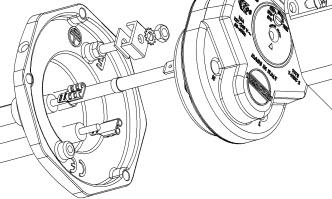
The T-MEC 2 thermostat is the only approved thermostat for your Thermowatt heater. If the thermostat fails internally (sensor malfunction, electronic component failure, or a faulty cutout mechanism), it cannot be repaired—it must be replaced with an identical T-MEC 2 unit. Warning signs of thermostat failure include: safety cutout activating when water temperature is well below 70°C, the adjustment knob stuck or unable to change heating modes, no power reaching the thermostat despite correct electrical connections, or heating continuing indefinitely without shutting off at the set temperature.
Qualified electrician consultation
The manual requires that “This unit should be connected by a suitably qualified electrician in accordance with the latest I.E.E. regulations.” This same requirement applies to thermostat replacement and diagnosis of electrical faults. Contact a qualified electrician (ask them to confirm their qualifications and experience with immersion heaters) to inspect your wiring, test the thermostat, and replace components if needed. For service inquiries, you can reach Thermowatt directly at [email protected] or visit www.thermowatt.com.
FAQ
What temperature should I set my Thermowatt T-MEC 2 thermostat to?
The manual recommends a low water temperature to reduce limestone deposits—ideally no lower than 60°C. The thermostat comes factory-set to ECO mode at 70°C. If you’re in OPK mode, the maximum is 60°C. In MAX mode, you can set up to 70°C. Higher temperatures don’t provide better performance; they simply increase running costs and limescale buildup.
Can I use a different thermostat if my T-MEC 2 fails?
No. The manual states explicitly: “THIS UNIT MUST NOT BE MODIFIED IN ANY WAY. Thermowatt approval is dependent upon the fitting of the appropriate Bipolar Dual Safety Thermostat.” You must use only the T-MEC 2 replacement thermostat. Using any other thermostat voids your warranty and may create safety hazards.
Why does my heater keep tripping the safety cutout?
Frequent safety cutout activation (more than once monthly) indicates the thermostat sensor or safety device is faulty and requires professional diagnosis. A simple workaround is to lower your thermostat setting by rotating the knob anticlockwise one or two positions. However, this is a temporary fix—consult a qualified electrician to determine whether the thermostat needs replacement.
What’s the difference between ECO and MAX mode?
ECO mode is the factory setting that uses smart learning technology to adjust heating based on your actual hot water usage patterns, saving energy automatically. MAX mode provides constant heating to 70°C (or lower if you adjust it down). ECO is more efficient for typical households; MAX is suitable if you want the fastest hot water recovery regardless of energy use.
Is it normal for my heater to stop heating once water reaches a certain temperature?
Yes, that’s exactly how the T-MEC 2 thermostat works. Once water reaches your set temperature (whether 60°C, 70°C, or your chosen level), the thermostat disconnects power and heating stops. The thermostat cycles back on only when water cools slightly below the target. This on-off cycling is normal and keeps water at your desired temperature without wasting energy.
Your Thermowatt immersion heater not heating water is almost always solvable through these five systematic checks. Start by confirming adequate water level and correct thermostat mode, then inspect electrical connections and power supply. If the safety cutout has tripped, reset it following the proper procedure. Only when these checks fail should you contact a qualified electrician for thermostat replacement. By following this troubleshooting sequence, you’ll restore hot water quickly and confidently.