Your Amazon Basics 5-cup coffee maker refusing to brew is a frustrating start to the day, but the cause is almost always simple. This guide walks through the most common fixes in order, from power connections to control panel settings, to get your machine back in action quickly.
Quick Answer: First, ensure the polarized plug is fully and correctly inserted into the outlet. Then, check that the water reservoir is filled and press the “Brew Now” button. The machine has built-in safety features that prevent operation if the plug isn’t seated properly or if the tank is empty.
Check Power and Plug
If the coffee maker shows no signs of life—no lights, no display, no sound—start with the power connection before investigating anything else.
Polarized Plug Orientation
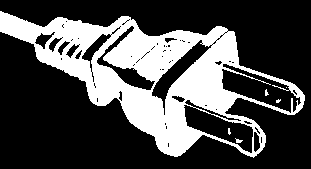
This model uses a polarized plug, where one blade is wider than the other. This safety design means it only fits into a standard outlet one way. If inserted upside-down or not pushed in completely, it won’t make contact and the unit gets no power.
- Unplug the coffee maker from the wall outlet.
- Look at the plug. Identify the wider blade.
- Re-insert the plug firmly, aligning the wider blade with the wider slot in your outlet.
- If it doesn’t fit, reverse the plug. Never try to force or modify the plug. If the outlet feels warm or the plug still won’t seat properly, do not use that outlet.
Secure Outlet Connection
The power cord is intentionally short to reduce tripping hazards. If you must use an extension cord, it must have an electrical rating at least as great as the coffee maker’s (check the label on the bottom of the unit) and be a grounding-type 3-wire cord. Always arrange the cord so it won’t be pulled or tripped over. For troubleshooting, always start by plugging the machine directly into a known-working wall outlet.
Verify Controls and Settings
If the clock display is on but pressing “Brew Now” does nothing, the issue is likely with the control settings. Accidentally activating the delay brew mode or having an unset clock are common culprits.
Brew Now vs. Brew Later Mode
The control panel has two primary buttons: “Brew Now” and “Brew Later,” each with a corresponding indicator light. If the “Brew Later” light is lit, the machine is waiting for a programmed start time and will not brew immediately. To start a cycle right away, press the “Brew Now” button. Its light should illuminate, and you should hear the heating element engage within a minute. If you set a delay by mistake, pressing “Brew Now” cancels it.
Setting the Clock Correctly
The clock is integral to the machine’s operation. After plugging in the unit, you must set the current time using the “Hour” and “Minute” buttons. The display will show an AM/PM indicator. The clock sets automatically after 5 seconds of inactivity. Once the time is set, try the “Brew Now” function again. For persistent issues with the delayed brew feature, our dedicated guide on Amazon Basics Coffee Maker Brew Later Not Working has more detailed solutions.
Ensure Water Tank is Filled
A critical safety rule: never operate the appliance with an empty water tank. The machine has a dry-boil protection feature that prevents the heating element from turning on without water, which manifests as a complete failure to brew.
Correct Water Level Measurement
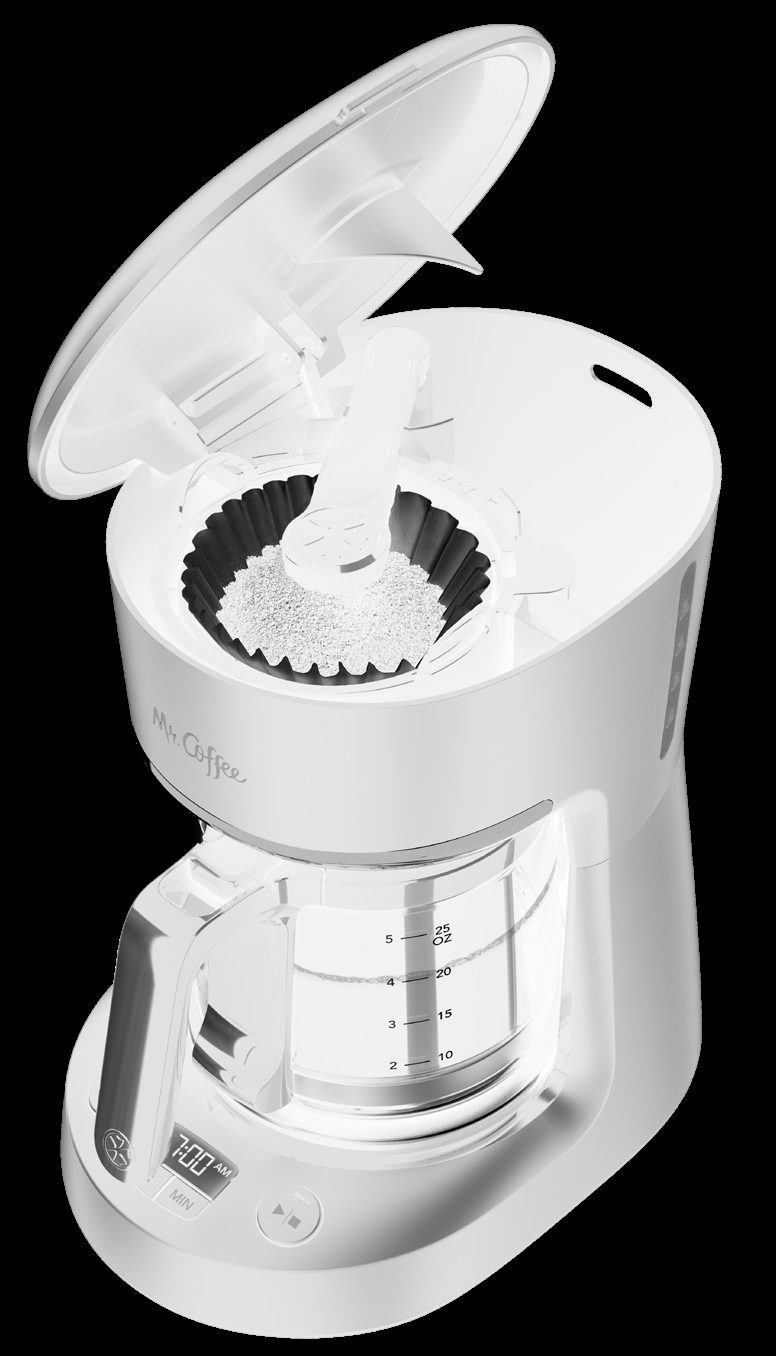
Use the included 0.8 Qt (5-cup) glass carafe to measure. Note that a coffee maker “cup” is typically 5 fluid ounces, not 8.
- Fill the glass carafe with fresh cold water to the desired level (e.g., the 5-cup line for a full pot).
- Pour this water into the water reservoir at the back of the unit.
- Ensure the reservoir lid closes completely. Some water will be retained by the coffee grounds, so the final yield in the carafe will be slightly less.
With the tank filled, press “Brew Now.” You should hear the sound of water heating shortly.
Reset and Initial Cleaning
For a new machine or one that’s been sitting unused, internal components may need a reset. A water-only cleaning cycle is the best first step.
Run a Water-Only Brew Cycle
This clears manufacturing residues or mineral deposits from the internal tubes and heating chamber, serving as a functional test.
- Wash the carafe, lid, and removable filter basket with mild detergent. These parts are top-rack dishwasher safe.
- Reassemble the coffee maker with the empty basket and a clean filter (no coffee).
- Fill the water reservoir with fresh cold water to the 5-cup line.
- Press the “Brew Now” button and let the entire cycle complete.
- Discard the hot water and rinse all parts again.
If the machine completes this cycle, the issue was likely a minor blockage. If it fails, a deeper problem may exist.
Unplug and Cool Down
If the machine overheated or behaved erratically, a full power reset can clear its internal logic.
- Ensure the unit is off, then unplug it from the wall.
- Let it sit unplugged for at least 15 minutes to allow components to fully cool and reset.
- Plug the unit back in, set the clock, fill the water tank, and try a “Brew Now” cycle again.
| Problem | Quick Fix | Expected Result |
|---|---|---|
| No power, no lights | Check polarized plug is fully inserted correctly. | Clock display lights up. |
| Clock is on, but pressing ‘Brew Now’ does nothing | Ensure water reservoir is filled and press ‘Brew Now’ button to exit ‘Brew Later’ mode. | ‘Brew Now’ light turns on; heating begins. |
| Machine turns on but no water flows through | Run a water-only cleaning cycle to clear internal lines. | Full cycle completes, hot water in carafe. |
| Machine brews but coffee is weak | Use more ground coffee; ensure you’re using correct measurements. | Bolder, hotter coffee. See our full guide on fixing weak coffee. |
Frequently Asked Questions
What should I do if my new Amazon Basics coffee maker won’t start at all?
Perform the initial cleaning procedure: wash all removable parts, reassemble, fill the tank with water only, and run a brew cycle. This primes the system. If it still doesn’t work, double-check the polarized plug is correctly seated in a working outlet.
Why does the “Brew Now” light come on but then go off without brewing?
This usually signals the dry-boil protection has activated due to insufficient water. Ensure you’ve filled the reservoir completely using the carafe as a measure and that the brew basket is correctly seated, allowing the reservoir lid to close fully.
Can I use an extension cord with this coffee maker?
Yes, but the extension cord must have a electrical rating matching or exceeding the coffee maker’s, be a grounding-type 3-wire cord, and be positioned to avoid being pulled or tripped over. Direct wall outlet connection is always recommended for safety and performance.
The clock resets every time I unplug the machine. Is this normal?
Yes. This model lacks a backup battery. Unplugging it or a power outage will reset the clock to 12:00, requiring you to set it again using the Hour and Minute buttons. This does not impair brewing functionality once the time is reset.
I see water in the tank, but it’s not heating up. What’s wrong?
Confirm the “Brew Now” light is on. Listen near the warming plate for a faint hum or heating sound within 60-90 seconds. If silent, unplug the unit, let it cool for 15 minutes, and try again with a full tank. Persistent silence suggests a potential heating element failure.
My machine started brewing but then stopped and now won’t restart. What happened?
This can indicate an overheating safety cutoff, often due to mineral scale blocking water flow and causing the heater to overheat. Unplug the machine, let it cool for 30 minutes, ensure the tank is full, and try a water-only cycle. For issues related to water flow and blockages, our article on coffee maker leaking covers related symptoms.
Official Documentation
Want the full specifications and manufacturer instructions? Download the official Amazon Basics 5 Cup Drip Coffee Maker with Glass Coffee Pot (0.8 Qt), Auto Shut-off, Auto Pause, Removable Filter Basket, Mat manual (PDF).
