Your BLACK+DECKER 12-Cup Digital Coffee Maker is overflowing and creating a mess on your counter. The cause is almost always tied to either the Sneak-A-Cup™ feature or how you’re preparing the water and grounds. The fix is simple: replace the carafe quickly during a pause and don’t exceed the machine’s limits for coffee and water.
Quick Answer: The most likely cause is leaving the carafe out for more than 30 seconds while using the Sneak-A-Cup™ feature. The brew cycle resumes automatically, and hot coffee spills over the filter basket. Put the carafe back on the hot plate within 30 seconds of removing it.
Why Is My BLACK+DECKER 12-Cup Coffee Maker Overflowing?
An overflow during brewing isn’t a sign of a broken machine. It’s an operational issue. The coffee maker is engineered with specific limits for water volume, coffee grounds, and user interaction during the brew cycle. Exceeding any of those limits will push coffee over the top of the filter basket. The three most common causes map directly to the machine’s core functions.
Removed the Carafe Too Long During Sneak-A-Cup (Over 30 Seconds)
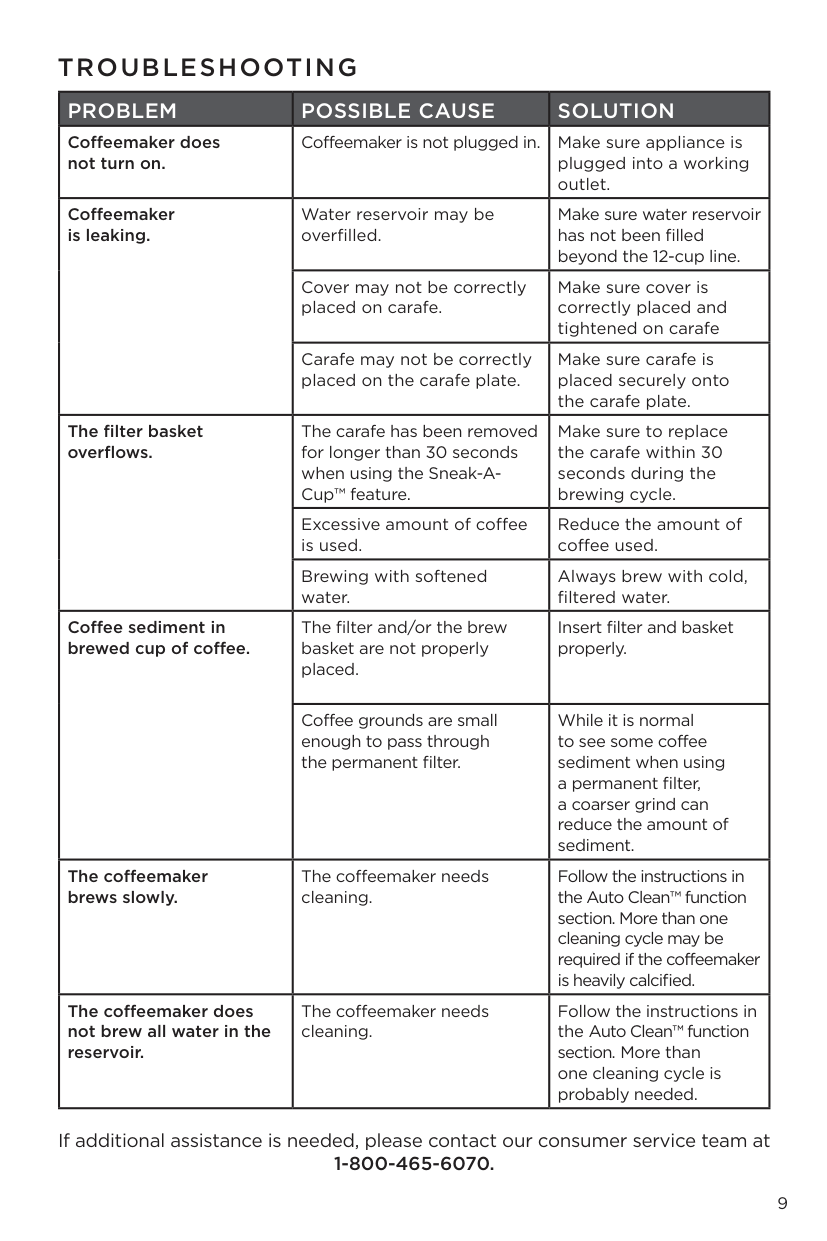
The Sneak-A-Cup™ feature pauses coffee flow when you pull the carafe off the hot plate mid-brew. But that pause is temporary. The machine resumes brewing exactly 30 seconds after the carafe is removed. Wait longer than that, and hot coffee keeps dripping into the filter basket with nowhere to go. The basket fills up and overflows.
Too Much Coffee Grounds Used
The filter basket has a fixed physical capacity. The machine makes a full 12-cup carafe using up to 60 ounces of water, and the basket is sized accordingly. Pile in too much ground coffee, and you reduce the space available for water to pass through. The water backs up behind the compacted grounds, rises above the basket rim, and spills out.
Using Softened or Distilled Water
Water type has a direct effect on brewing. BLACK+DECKER specifies using cold, filtered water or spring water. Softened water can introduce additives that interfere with flow through the grounds. Distilled water, on the other hand, lacks the mineral content the machine needs to extract coffee properly, which can also disrupt the brewing process. Either type increases the chance of a backup and overflow.
Fixing the Sneak-A-Cup™ Auto Pause Overflow
The Sneak-A-Cup™ feature is useful, but it demands one strict habit. Get this right, and you’ll prevent most overflow incidents.
How the Sneak-A-Cup™ Pause Works
When you lift the carafe off the hot plate during brewing, a sensor detects the removal and stops the flow of coffee from the filter basket. The LED on the ON/OFF button stays lit, indicating the cycle is still active — just paused. This lets you pour a cup without waiting for the full 12-cup cycle to finish.
The Critical 30-Second Rule
The pause isn’t indefinite. After exactly 30 seconds without the carafe in place, the system resumes brewing automatically. With the carafe still out, fresh coffee has nowhere to land and spills over the sides of the filter basket. This is by far the most common overflow scenario, and it’s entirely preventable.
Pro Tip: Keep the Carafe Close
Have your mug ready in one hand and keep the carafe in the other when you remove it from the plate. Pour quickly, then set the carafe back on the hot plate immediately. Making this a habit means you’ll never accidentally exceed the 30-second window.
Filter Basket Overflow From Too Much Coffee or Bad Water
If you’re not using Sneak-A-Cup or the overflow happens at the very end of a cycle, the problem is in your preparation. The filter basket depends on the right ratio of water to grounds to drain properly.
Use the Right Amount of Ground Coffee
For a full 12-cup brew, use roughly 1/2 to 3/4 cup of ground coffee (about 7 to 10 tablespoons). For smaller batches of 4 cups or fewer, BLACK+DECKER recommends pressing the STRONG button, which extends the brew time to improve extraction at lower volumes. Overfilling the basket with grounds is one of the most reliable ways to trigger an overflow — the compacted coffee blocks water from draining through at the rate the machine pumps it in.
Use Cold, Filtered Water — Fill Only to the Desired Line
Fill the 60-ounce reservoir with cold water only to the line matching your desired number of cups. Never fill past the 12-cup maximum marker — doing so can cause the reservoir to leak and virtually guarantees an overflow during brewing. Use filtered or spring water. Avoid softened water, which can leave residue that restricts flow, and avoid distilled water, which won’t extract flavor properly. Don’t pre-heat the water; start with a cold fill for accurate measurement.
Seat the Filter and Brew Basket Correctly
After placing a paper filter (or the included permanent filter) into the brew basket, press it flat against the basket walls. Then make sure the basket clicks securely into the machine. A tilted or loose basket lets coffee bypass the filter entirely and leak from the sides. Close the lid firmly until it latches.
| Problem | Quick Fix | Expected Result |
|---|---|---|
| Overflow during brewing (Sneak-A-Cup) | Replace the carafe within 30 seconds of removing it. | Brewing pauses cleanly without resuming and spilling. |
| Overflow from filter basket top | Use less ground coffee (1/2 to 3/4 cup for a full pot); use cold, filtered water only. | Water flows through grounds without backing up. |
| Coffee leaking from carafe area | Ensure carafe lid is tight and carafe sits flat on the hot plate. | Coffee stays contained in the carafe during and after brewing. |
| Coffee sediment in cup | Use a coarser grind with the permanent filter; make sure filter and basket are seated flush. | Fewer fine particles pass into brewed coffee. |
Coffee Sediment in Your Cup? Check These
An overflow isn’t the only mess to deal with. Grit at the bottom of your mug is usually a filter issue rather than an overflow issue, but it’s just as fixable.
Seal the Filter and Brew Basket Properly
Sediment almost always enters the cup because of a poor seal. If the paper filter isn’t pressed flush against the basket walls, or if the basket isn’t seated squarely in the machine, grounds slip past the edges and end up in your coffee. Take an extra few seconds to press the filter flat and confirm the basket clicks into place.
Use a Coarser Grind with the Permanent Filter
The machine ships with a washable permanent filter. It’s convenient, but its mesh is wider than a paper filter, so some fine sediment will get through. Switching to a slightly coarser grind dramatically reduces the number of tiny particles that pass through. Expect a small amount of sediment as a trade-off for the convenience of a reusable filter — that’s normal behavior, not a defect.
Frequently Asked Questions
Can I use the Sneak-A-Cup feature with the permanent filter?
Yes. The auto-pause mechanism is triggered by removing the carafe from the hot plate — it’s independent of the filter type. The feature works identically with the permanent filter or a standard paper filter.
How do I know if my coffee maker needs cleaning, which might cause overflow?
Watch for two signs: the brew cycle takes noticeably longer than usual, or water remains in the reservoir after the machine finishes. Both indicate mineral buildup restricting flow, which can cause the filter basket to overfill and spill. Run the Auto Clean cycle — you may need two passes on a heavily calcified machine. Our step-by-step guide on running Auto Clean on your BLACK+DECKER coffee maker walks through the full process.
Does the coffee maker overflow if I fill it past the 12-cup line?
Yes. The 12-cup line marks the maximum volume the system is calibrated to handle. Filling past it can cause the reservoir to overflow and almost always leads to a filter basket spill during brewing. Stick to the marked lines on the water window.
My coffee maker is leaking from the bottom. Is this the same as overflowing?
No. A leak from the bottom points to a problem with the carafe setup, not the brewing process. Check that the carafe lid is locked on tight and that the carafe sits flat and fully seated on the hot plate. For a full walkthrough, see our guide on fixing leaks in your BLACK+DECKER coffee maker.
Will using the STRONG button cause overflow?
No. The STRONG button extends the brew timing to pull more flavor from the grounds — it does not increase water volume or pump speed. It actually improves results when brewing smaller amounts (4 cups or less), which are more prone to weak, watery coffee without the extended extraction.
How long does the Keep Warm function stay on?
The hot plate maintains temperature for 2 hours after the brew cycle finishes. The ON/OFF light stays on throughout that period. After 2 hours, the heater shuts off and the light goes dark. You can also power down at any point by pressing the ON/OFF button.
Official Documentation
Want the full specifications and manufacturer instructions? Download the official BLACK+DECKER 12-Cup Digital Coffee Maker, Programmable, Washable Basket Filter, Sneak-A-Cup, Auto Brew, Water Window, Keep Ho manual (PDF).
