If your Black+Decker 12-cup coffee maker’s Brew Later function isn’t working, you’re likely facing a simple setting error, a timing issue, or the aftermath of a power interruption. This common problem has a straightforward fix. We’ll show you how to correctly set, check, and cancel the function, and explain exactly what happens during a power outage so you can restore your automatic morning brew.
Quick Answer: To fix a non-working Brew Later function, first press the Brew Later button once to check the currently set time. If it’s incorrect, use the Hour and Min buttons to adjust it while the display blinks, then press Brew Later again to confirm. If the function was disabled by a power outage, you must reprogram the Brew Later time after resetting the clock.
How to Set the Brew Later Function
The Brew Later function is straightforward, but missing a single step can cause it to fail. The process differs slightly depending on whether you’re programming it for the first time or just checking and adjusting an existing setting.
Initial Setup Steps
Follow these steps precisely when setting the Brew Later time for the first time, or after the unit has been unplugged and lost its memory.
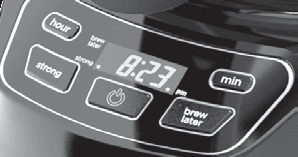
- Press the BREW LATER button. The LED light in the display next to the “BREW LATER” label will illuminate and flash once per second. This blinking is your signal that you’re in programming mode.
- Check the displayed time. The clock will show the last Brew Later time that was programmed. However, if no time has ever been set, or if the coffeemaker was unplugged, the default time displayed will be 12:00 a.m.
- Set the correct time. While the “BREW LATER” display is blinking, use the HOUR and MIN buttons to adjust the time to when you want the coffee to start brewing. Remember to set it for the correct AM or PM period.
- Confirm the setting. You have two options: press the BREW LATER button a second time to immediately set the time, or simply wait. The coffeemaker will automatically save the programmed time and exit the setting mode after 4 seconds of no button presses.
Once confirmed, the unit is programmed and will begin its brew cycle at the set time. You do not need to leave the power switch in the “On” position; the Brew Later function operates independently.
Checking or Changing the Set Time
If you’ve already programmed a Brew Later time and want to verify it or make a change, the process is a quick check-in.
- Press the BREW LATER button once. The clock display will flash once per second and show the currently programmed Brew Later time for exactly 4 seconds.
- Decide to change or leave it. During this 4-second window, you can reset the time if it’s wrong. Simply use the HOUR and MIN buttons to adjust it, then press BREW LATER again to save the new time. If the time is correct, do nothing—after 4 seconds, the display will revert to the current time, leaving your original Brew Later setting intact.
Troubleshooting Brew Later Problems
Most issues stem from not understanding how to cancel the function or what happens when power is lost. Here’s how to handle those specific scenarios.
How to Cancel the Function
If you’ve set Brew Later but no longer need it, or if you want to brew coffee immediately, you must properly cancel the scheduled brew. Simply turning the power switch off will not cancel it.
- Press and hold the BREW LATER button. You must hold it down continuously.
- Keep holding for 3 seconds. The function will be disabled.
- Release the button. Four seconds after you release it, the clock will revert to showing the current time.
An important note: Even after you cancel the Brew Later function, the programmed time is still stored in the machine’s memory. The next time you press the Brew Later button, that previously set time will appear. The time is only erased if the unit is unplugged from the wall outlet.
What Happens After a Power Outage
This is the most common cause of a “Brew Later not working” complaint. The coffee maker does not have a backup battery for its clock or memory. If it loses power—even for a second—two things happen: the clock resets to 12:00, and the Brew Later function is disabled. However, the last programmed Brew Later time is not erased; it remains in memory, defaulting to 12:00 a.m. if it was never set before.
After a power blip, you’ll see the clock flashing 12:00. The Brew Later function is now inactive. You must first set the current time using the HOUR and MIN buttons (the clock stops flashing once set). Then, you must reprogram the Brew Later function from scratch using the “Initial Setup Steps” above. Pressing Brew Later will show the old stored time (likely 12:00 a.m.), which you must then correct to your desired brew time.
| Problem | Quick Fix | Expected Result |
|---|---|---|
| Brew Later didn’t start | Reprogram after power outage. Check AM/PM setting. | Brews at newly set time. |
| Can’t tell if it’s set | Press Brew Later button once to check time for 4 sec. | Display shows programmed brew time. |
| Need to stop scheduled brew | Hold Brew Later button for 3 seconds. | Function disabled, clock returns to current time. |
| Display shows wrong Brew Later time | Press Brew Later, adjust with Hour/Min during 4-sec window, press Brew Later again. | New time is saved for next use. |
Frequently Asked Questions
Do I need to leave the power switch on for Brew Later to work?
No. The Brew Later function operates independently of the main power switch. As long as the coffeemaker is plugged into a live outlet, the internal timer will activate the brew cycle at the set time.
Why did my coffee maker brew at 12:00 a.m.?
This happens if the Brew Later time was accidentally set to 12:00 a.m. (the default) and never changed. It can also occur after a power outage: the clock resets to 12:00, but the machine still tries to brew at the stored time relative to that wrong clock. For example, if you had set 7:00 a.m., it will brew 7 hours after the clock reset to 12:00.
I held the Brew Later button but it didn’t cancel. What’s wrong?
You must hold the button down for a full 3 seconds. A quick press only checks the time. Ensure you’re pressing firmly and continuously until the function disengages.
Can I set Brew Later for more than 24 hours in advance?
No. The Brew Later function is a simple 12-hour timer. You set it for a time of day (e.g., 6:00 AM). It will attempt to brew at that time every day until you cancel it or a power outage disables the function.
Water is in the reservoir and Brew Later is set, but no coffee was made. What happened?
The most likely culprit is a power interruption that disabled the timer without you realizing it. Always check that the clock is showing the correct current time. If it’s flashing or wrong, a power outage occurred and you need to reset both the clock and the Brew Later function.
Is it safe to clean the coffee maker if Brew Later is set?
For any cleaning involving the carafe, filter basket, or exterior wiping, it is safe. However, always unplug the unit and let it cool before cleaning. Unplugging it will cancel any Brew Later setting and erase the clock, so you will need to reprogram it after cleaning.
You Might Also Like
- BLACK+DECKER 12-Cup Digital Coffee Maker, Programmable, Washable Basket Filter, Sneak-A-Cup, Auto Brew, Water Window, Keep Ho
- BLACK+DECKER 12-Cup Digital Coffee Maker, Programmable, Washable Basket Filter, Sneak-A-Cup, Auto Brew, Water Window, Keep Ho
- BLACK+DECKER 12-Cup Digital Coffee Maker, Programmable, Washable Basket Filter, Sneak-A-Cup, Auto Brew, Water Window, Keep Ho
Official Documentation
Want the full specifications and manufacturer instructions? Download the official BLACK+DECKER 12-Cup Coffee Maker with Easy On/Off Switch, Easy Pour, Non-Drip Carafe with Removable Filter Basket, Vortex Tec manual (PDF).
